Discover the essential techniques to learn React JS hooks with examples, enabling you to enhance your functional components and streamline your development process. Mastering hooks allows for more concise, efficient, and maintainable code, transforming how you build React applications.
This comprehensive guide covers fundamental hooks such as useState, useEffect, and useContext, as well as advanced concepts like custom hooks and performance optimization. Through practical examples and best practices, you’ll gain a clear understanding of how to leverage hooks to create dynamic and robust user interfaces.
Introduction to React JS Hooks

React hooks are functions that enable developers to use state and other React features within functional components. Introduced in React version 16.8, hooks have transformed the way developers build React applications by allowing functional components to manage side effects and internal state without relying on class components.
Before hooks, class components were primarily used when state management or lifecycle methods were needed. This often led to complex and verbose code, especially in large applications. Hooks simplified this process by providing a more concise, readable, and reusable approach, encouraging developers to write cleaner and more maintainable code. They have not only enhanced the expressiveness of React components but also facilitated the sharing of logic across components through custom hooks.
Evolution and Benefits of React Hooks
React hooks revolutionized React development by introducing a new paradigm where functional components could handle stateful logic traditionally reserved for class components. This change was motivated by the desire to improve code reuse, readability, and simplicity in React applications.
Compared to class components, hooks offer several benefits:
- Simplified Syntax: Hooks allow developers to write less boilerplate code, making components easier to read and maintain.
- Enhanced Reusability: Custom hooks enable sharing logic between components without changing component hierarchies.
- Elimination of `this` : Using hooks avoids the complexities associated with the `this` context in class components, reducing errors and confusion.
- Better separation of concerns: Hooks enable developers to organize logic related to state and side effects separately, improving component clarity.
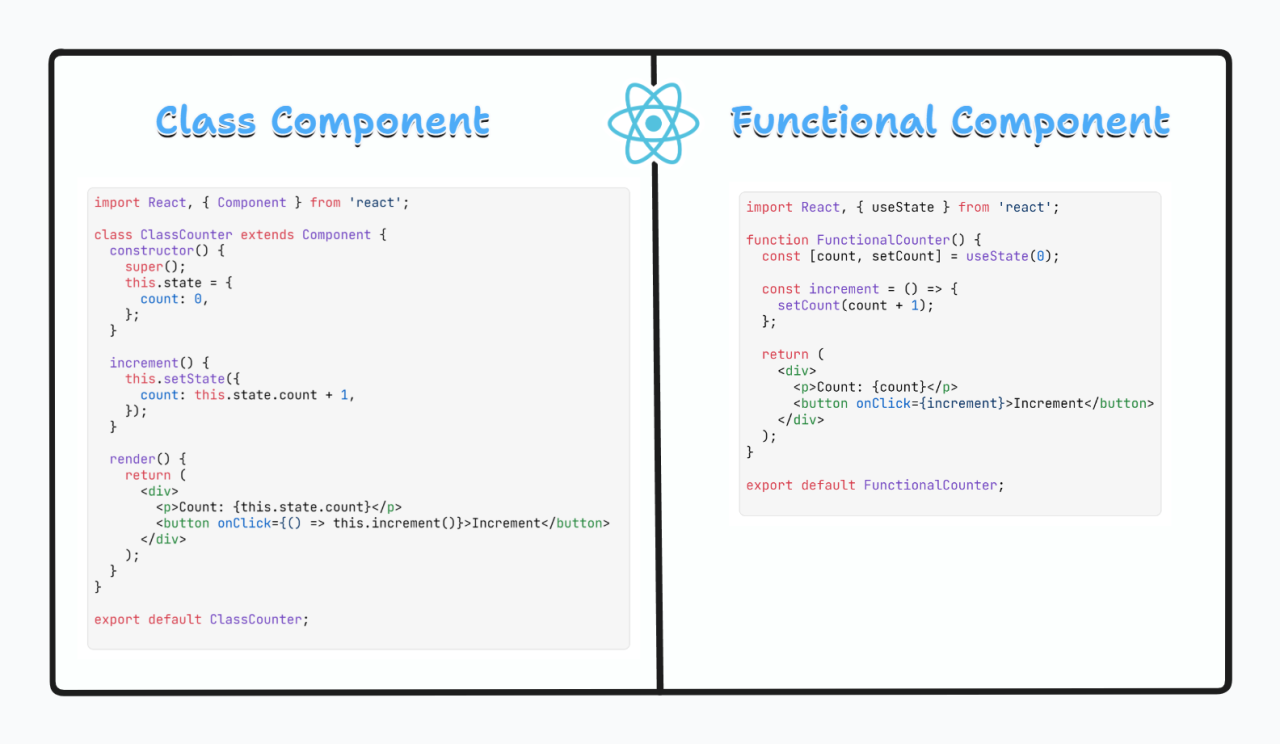
For example, in a class component, managing a counter would involve defining state with `this.state` and updating it with `this.setState`, which can be verbose and error-prone. With hooks, this can be achieved succinctly using the useState hook, making the code more straightforward:
const [count, setCount] = useState(0);
This simplicity encourages developers to adopt functional components entirely, leading to more predictable and easier-to-test codebases. Overall, hooks have fundamentally changed React development, fostering a more functional and modular approach that enhances productivity and code quality.
Basic Hooks in React

The React Hooks API introduces a set of functions that enable functional components to manage state, handle side effects, and share data effectively. Understanding these core hooks is essential for developing dynamic and responsive user interfaces with React. The following sections explore the most fundamental hooks—useState, useEffect, and useContext—each illustrated with practical examples to clarify their application.
These hooks simplify state management and side effect handling, replacing the need for class components and enhancing code readability and maintainability. Mastery of these hooks lays a solid foundation for building complex React applications efficiently.
useState Hook
The useState hook allows components to manage local state variables that can change over time. It returns an array with two elements: the current state value and a function to update that value. This hook is fundamental for creating interactive components that respond to user input or other events.
| Hook | Purpose | Example | Description |
|---|---|---|---|
| useState | Manage local state within functional components |
const [count, setCount] = useState(0);

return (
  <div>
    <p>Count: count</p>
    <button onClick=() => setCount(count + 1)>Increment</button>
  </div>
);
|
The code initializes a state variable count with a starting value of 0. Clicking the button calls setCount to update the count, which triggers a re-render displaying the new value. |
| useEffect | Handle side effects such as data fetching or subscriptions |
useEffect(() => document.title = `Count: $count`; , [count]); |
The effect updates the document title whenever count changes, demonstrating how to synchronize side effects with state changes. |
| useContext | Share global data across components without prop drilling |
const ThemeContext = React.createContext('light');

function ThemedButton()
  const theme = useContext(ThemeContext);
  return <button className=theme>Click Me</button>;
|
The example creates a context for theme data. The useContext hook accesses this data within the ThemedButton component, enabling consistent theming across the application.
|
Organizing these hooks using a table clarifies their distinct purposes and practical usage, assisting developers in selecting the appropriate hook for their specific needs in React development.
Advanced Hooks and Custom Hooks
Building upon the foundational understanding of React Hooks, this section delves into more sophisticated hook patterns that enhance the efficiency and reusability of React components. Mastering these advanced techniques allows developers to manage complex state logic, optimize performance, and create modular code that is easier to maintain and extend.
In this discussion, we will explore the useReducer hook as a powerful alternative to useState for handling intricate state updates, examine the performance optimization hooks useMemo and useCallback, and demonstrate how to design custom hooks that encapsulate reusable logic, fostering cleaner and more organized React codebases.
useReducer and Its Comparison with useState
While useState is suitable for simple state management, complex applications often require more sophisticated state handling mechanisms. The useReducer hook addresses this need by providing a predictable way to manage state transitions, especially when multiple related state variables or complex update logic are involved. It mimics the Redux pattern but localized within React components, offering a structured approach to state updates.
Below is a comparison highlighting the key differences:
| Aspect | useState | useReducer |
|---|---|---|
| Use Case | Simple, individual state updates | Complex state logic with multiple sub-values |
| State Management | Direct value setting with setter functions | Centralized reducer function processes actions |
| Code Complexity | Less verbose for simple updates | More verbose but scalable for complex logic |
| Sample Code |
// Using useState const [count, setCount] = useState(0); const increment = () => setCount(prev => prev + 1); |
|
useMemo and useCallback for Performance Optimization
React’s rendering behavior can sometimes lead to unnecessary computations or re-renders, especially in applications with large or complex components. The hooks useMemo and useCallback are designed to mitigate these issues by memoizing values and functions, respectively, ensuring they are recalculated only when dependencies change. This approach significantly enhances performance, particularly in scenarios involving intensive calculations or frequent re-renders.
useMemo memoizes expensive calculations, preventing re-computation on every render unless dependencies update. Conversely, useCallback returns a memoized version of a callback function, ensuring stable references across renders, which is vital when passing functions as props to avoid unnecessary child re-rendering.
useMemo Example
const heavyCalculation = (num) =>
  // Simulate a heavy computation
  let result = 0;
  for(let i = 0; i < 1e7; i++)
    result += num;

  return result;
;

const MyComponent = ( number ) =>
  const computedValue = useMemo(() => heavyCalculation(number), [number]);

  return Result: computedValue;
;
useCallback Example
const handleClick = useCallback(() =>
console.log('Button clicked');
, []);
return ;
Creating Custom Hooks for Reusable Logic
Custom hooks enable developers to encapsulate and reuse complex or frequently used logic across various components, promoting cleaner code and reducing duplication. These hooks follow the same naming convention with the “use” prefix, and they can include state management, side effects, or any other React feature.
Below is a sample custom hook that manages a toggle state, which can be reused in multiple components requiring toggle functionality:
function useToggle(initialValue = false)
  const [value, setValue] = React.useState(initialValue);
  const toggle = () => setValue(prev => !prev);
  return [value, toggle];
Sample Custom Hook Usage
const MyComponent = () =>
  const [isOpen, toggleOpen] = useToggle(false);

  return (
    <div>
      <button onClick=toggleOpen>Toggle</button>
      isOpen && <p>The toggle has been activated!</p>
    </div>
  );
;
Practical Applications and Examples
Implementing React Hooks in real-world projects enhances the efficiency, readability, and maintainability of your codebase. By working through practical examples, developers can understand how hooks streamline state management, side effects, and custom behaviors within React applications. This section provides step-by-step guidance on building simple yet effective React apps that leverage hooks, along with detailed code walkthroughs and organized best practices for usage patterns.
Incorporating hooks into your projects allows for modular and reusable logic, which is especially beneficial in complex applications. Through these examples, you will learn how to harness the power of hooks to create dynamic, interactive, and responsive user interfaces.
Building a React Application Using Hooks: Step-by-Step Guide
- Set up a new React project using Create React App or your preferred environment. Initialize the project and ensure React and ReactDOM are correctly installed.
- Create a functional component where hooks will be implemented. For example, a simple counter component.
- Use the
useState
hook to manage the counter’s state. Initialize the state with an initial value, such as zero.
- Implement buttons to update the state by incrementing and decrementing the counter. Use the setter function provided by
useState
within event handlers.
- Incorporate the
useEffect
hook to perform side effects, like logging the current count or fetching data when the component mounts or updates.
- Test the application by interacting with the buttons and observing state changes and side effects in the console or UI.
- Refine the application by adding features such as reset buttons, input fields, or styling to improve user experience.
Example Project: To-Do List with Hooks
This project demonstrates how to create a simple to-do list application utilizing
useState
for managing the list items and
useEffect
for persisting data to local storage. It exemplifies state management, side effects, and effect cleanup in a practical context.
- Initialize state with an empty list or retrieve existing tasks from local storage during component mount.
- Provide an input field for adding new tasks. Use
useState
to track the input value.
- Implement add, delete, and toggle completion functionalities, updating the task list accordingly.
- Use
useEffect
to synchronize the task list with local storage whenever it changes, ensuring data persistence across sessions.
- Design the UI with clear task separation, status indicators, and user-friendly controls for task management.
Code Walkthrough: To-Do List with useState and useEffect
import React, useState, useEffect from 'react';
function TodoApp()
// State for list of tasks
const [tasks, setTasks] = useState(() =>
// Retrieve existing tasks from local storage if available
const savedTasks = localStorage.getItem('tasks');
return savedTasks ? JSON.parse(savedTasks) : [];
);
// State for new task input
const [newTask, setNewTask] = useState('');
// Effect to synchronize tasks with local storage
useEffect(() =>
localStorage.setItem('tasks', JSON.stringify(tasks));
, [tasks]);
// Function to add a new task
const addTask = () =>
if (newTask.trim() !== '')
setTasks([...tasks, id: Date.now(), text: newTask, completed: false ]);
setNewTask('');
;
// Function to toggle task completion status
const toggleTask = (id) =>
setTasks(
tasks.map(task =>
task.id === id ? ...task, completed: !task.completed : task
)
);
;
// Function to delete a task
const deleteTask = (id) =>
setTasks(tasks.filter(task => task.id !== id));
;
return (
My To-Do List
setNewTask(e.target.value)
placeholder="Enter a new task"
/>
tasks.map((task) => (
-
toggleTask(task.id)
/>
task.text
))
);
export default TodoApp;This implementation highlights the core hooks:
useState
for managing tasks and input state, and
useEffect
for syncing local storage. The component efficiently manages user interactions, state updates, and side effects, making it a practical example of hooks in action.
Usage Patterns and Best Practices for React Hooks
Organizing hook usage effectively is crucial for maintainable React applications. Here are common patterns, along with best practices:
| Usage Pattern | Description | Best Practices |
|---|---|---|
| State Management | Use
for simple state variables within functional components. |
Initialize state lazily when complex computations are needed; keep state minimal and localized when possible. |
| Side Effects | Implement
for data fetching, subscriptions, or DOM manipulations. |
Specify dependencies carefully to avoid unnecessary re-renders; cleanup functions prevent memory leaks. |
| Custom Hooks | Create reusable logic by encapsulating hook combinations in custom hooks. | Follow hook naming conventions, keep hooks pure, and document their purpose clearly. |
| Effect Dependencies | Manage dependencies in
to control when effects run. |
Always specify dependencies explicitly; use
or
to optimize performance. |
Common Pitfalls and Best Practices in React JS Hooks
While React Hooks significantly simplify state management and side effects in functional components, developers often encounter common mistakes that can lead to bugs, performance issues, or code that is difficult to maintain. Understanding these pitfalls and adhering to best practices ensures robust, efficient, and predictable React applications.
Proper use of Hooks requires awareness of React’s rules and a disciplined approach to component design. This section explores frequent errors, the importance of following the rules of Hooks, and strategies to optimize performance through best practices, supported by practical code examples and comparative guidance.
Common Mistakes When Working with Hooks
Developers new to React Hooks sometimes make errors that can cause unexpected behavior or runtime errors. Recognizing these mistakes helps in preventing bugs and writing cleaner code.
- Calling Hooks Conditionally: Hooks must be invoked unconditionally at the top level of a component. Placing them inside loops, conditionals, or nested functions violates the Rules of Hooks, leading to inconsistent hook calls across renders.
- Using State or Effect Hooks Incorrectly: Misusing dependencies in useEffect, such as omitting essential dependencies or including unnecessary ones, can cause infinite loops or stale data issues.
- Mutating State Directly: Modifying state variables directly instead of using setter functions (e.g., setState) can cause React not to recognize state changes, preventing re-rendering.
- Ignoring Cleanup Functions: Neglecting to clean up subscriptions or timers in useEffect can lead to memory leaks or unexpected side effects, especially in components that unmount frequently.
Rules of Hooks and Their Enforcement
The Rules of Hooks are fundamental guidelines that ensure hooks work predictably and React can manage the component lifecycle effectively.
- Call Hooks at the Top Level: Hooks should be invoked directly inside functional components or custom hooks, not within nested functions, loops, or conditionals.
- Only Call Hooks from React Functions: Hooks must be called from React functional components or custom hook functions that follow the naming convention starting with “use”.
React enforces these rules through linting tools, like eslint-plugin-react-hooks, which can be integrated into the development environment. These tools warn developers of violations, helping prevent subtle bugs and ensuring consistent hook usage.
Performance Optimization with Hooks
Efficient use of hooks enhances the performance of React applications by minimizing unnecessary re-renders and optimizing side effects. Adopting best practices helps in writing performant components.
- Memoization with useMemo: Use useMemo to cache computed values that depend on specific dependencies, reducing expensive calculations on every render.
- Optimizing Callback Functions with useCallback: Wrap functions with useCallback when passing them as props to prevent child components from re-rendering unnecessarily.
- Component Memoization with React.memo: Wrap functional components with React.memo to prevent re-rendering when props haven’t changed.
const filteredData = useMemo(() => data.filter(item => item.active), [data]);
const handleClick = useCallback(() =>  /* handle click

-/ , [dependency]);
Combining these techniques ensures that React components remain responsive and resource-efficient, especially in large or complex applications.
Comparison Table: Do’s and Don’ts with Hooks
| Do’s | Don’ts |
|---|---|
| Invoke hooks at the top level of components. | Call hooks conditionally or within nested functions. |
| Use the correct dependency array in useEffect to manage side effects effectively. | Omit dependencies or include unnecessary ones, risking bugs or performance issues. |
| Use useMemo and useCallback to optimize performance in complex components. | Overuse memoization or apply it indiscriminately, which can add unnecessary complexity. |
| Follow the Rules of Hooks strictly to ensure predictable behavior. | Disregard React’s rules, leading to inconsistent hook calls and rendering issues. |
| Clean up side effects in useEffect with return functions to prevent memory leaks. | Neglect cleanup, especially in components with subscriptions or timers, risking performance degradation. |
Last Recap
In summary, mastering React JS hooks with examples unlocks new possibilities for modern React development. By understanding both basic and advanced hooks, along with practical application techniques, you are well-equipped to build efficient and scalable applications. Continue exploring and applying these concepts to stay ahead in your React journey.