Understanding how to use git branches to manage features is essential for streamlining the development process and maintaining a clean project history. Branching allows teams to work on multiple features simultaneously without interfering with the main codebase, thereby enhancing collaboration and reducing conflicts.
This guide explores the fundamental strategies for creating, managing, and merging branches, providing practical techniques to isolate feature development, resolve conflicts, and collaborate efficiently through pull requests. Mastering these practices ensures a more organized and agile development workflow.
Overview of Git Branching Strategy
In modern software development, managing multiple features, bug fixes, and releases efficiently requires a structured approach to version control. Git branching strategy serves as a foundational methodology that allows development teams to organize their work systematically, ensuring parallel development and streamlined integration processes. Understanding how branches work and their strategic implementation can significantly enhance collaboration, reduce conflicts, and improve overall project quality.
Branches in Git are lightweight pointers to commits that enable developers to diverge from the main codebase, work independently on different features or fixes, and then merge back seamlessly. This flexibility fosters an environment where multiple development efforts can coexist without interference, making it easier to maintain stability in the main branch while experimenting or developing new features.
Purpose of Branches in Version Control
Branches serve as isolated environments within a repository, allowing developers to work on specific tasks without affecting the primary codebase. This separation ensures that incomplete or experimental changes do not disrupt the stability of the main branch, often named ‘main’ or ‘master’.
Furthermore, branches facilitate clear workflows by providing a dedicated space for feature development, bug fixes, or release preparation. This organizational structure supports continuous integration practices, where changes from various branches are regularly merged into the main line after passing tests and reviews.
Facilitation of Feature Management through Branches
Feature management is streamlined by creating dedicated branches for each new feature or enhancement. This approach allows developers to focus solely on their specific task, encouraging modular development and easier debugging. Once a feature is complete and tested, it can be merged into the main branch, minimizing the risk of introducing unstable code into production.
Using branches also enables parallel development; multiple features can be developed simultaneously by different team members without conflict. This concurrency accelerates project timelines and enhances team productivity. Additionally, feature branches can be reviewed independently, supporting code quality standards and peer review processes.
Common Branching Models
Several branching models are prevalent in development workflows, each suited to different project sizes and team structures. Selecting an appropriate model ensures efficient collaboration and reliable delivery cycles.
| Branching Model | Description | Typical Use Case |
|---|---|---|
| Git Flow | A comprehensive model introducing dedicated branches for features, releases, and hotfixes. It involves structured workflows with multiple long-lived branches, facilitating organized release management. | Large projects with scheduled release cycles requiring strict separation of development stages. |
| GitHub Flow | A simplified model emphasizing continuous deployment. Developers create feature branches from the main branch, propose pull requests, and merge after review. | Web applications and teams practicing continuous integration and deployment. |
| GitLab Flow | Combines feature-driven development with environment-based workflows, integrating issue tracking and deployment strategies. | Teams that need to align development with deployment environments and issue management. |
Choosing the appropriate branching strategy depends on project requirements, team size, release frequency, and stability needs. Proper adoption of these models ensures streamlined development, easier collaboration, and reliable delivery pipelines.
Creating and Managing Branches
Efficient management of branches is fundamental to maintaining a clean, organized, and collaborative Git workflow. Properly creating, switching, and organizing branches enables teams to develop features independently, test new ideas safely, and keep the main project stable. Mastering these operations ensures that development proceeds smoothly without conflicts or confusion.
This section provides a systematic approach to creating new branches for features, switching between branches effectively, and organizing branches through listing, renaming, and deleting them. These skills are essential for a structured and scalable version control process.
Creating a New Branch for a Feature
Creating a dedicated branch for a new feature isolates development work, reduces risks to the main codebase, and simplifies collaboration. The process involves identifying the point in the repository to branch from, typically the main or develop branch, and creating a new branch for the feature development.
- Ensure your local repository is up to date by pulling the latest changes:
- Create a new branch with a descriptive name that reflects the feature or task, such as
feature/login-system: - Switch to the newly created branch to start development:
git checkout main
git pull origin main
git branch feature/login-system
git checkout feature/login-system
Alternatively, you can combine creation and switching into one command:
git checkout -b feature/login-system
Switching Between Branches Effectively
Switching branches allows developers to move between different lines of work seamlessly. Proper switching ensures that changes are made in the correct context, avoiding conflicts and maintaining workflow consistency.
- List all available branches to identify the target branch:
- Switch to a different branch, such as the main branch, by executing:
- If switching to a branch that has been updated remotely, ensure you pull the latest changes to synchronize your local copy:
- To switch to a branch that does not exist locally but exists remotely, simply use:
git branch -a
git checkout main
git pull origin main
git checkout -borigin/
Organizing Branches: Listing, Renaming, and Deleting
Managing branches effectively includes keeping your branch list clean and organized. Renaming branches can improve clarity, while deleting obsolete branches prevents clutter and reduces confusion among team members.
- Listing all local branches provides an overview of current development lines:
- Renaming a branch allows for better identification of its purpose. Switch to the branch you wish to rename or stay on it, then execute:
- Deleting branches that are no longer needed helps maintain a tidy repository. To delete a local branch, use:
git branch
To include remote branches, add the -a flag:
git branch -a
git branch -m new-branch-name
If renaming from another branch, first switch to it:
git checkout old-branch-name
git branch -m new-branch-name
git branch -d branch-name
If the branch has unmerged changes, and you wish to force delete, use:
git branch -D branch-name
To remove remote branches that are obsolete, execute:
git push origin --delete branch-name
Using Branches to Develop Features
Effective feature development in Git hinges on isolating work within dedicated branches, ensuring that new functionalities can be built, tested, and refined without disrupting the stability of the main codebase. Utilizing branches for feature development allows teams to work concurrently, minimize conflicts, and maintain a clear history of changes specific to each feature. This approach supports a structured workflow that enhances collaboration and code quality across development cycles.
Adopting a disciplined process for creating, updating, and managing feature branches is essential for efficient development. Regularly syncing feature branches with the latest changes from the main or develop branches helps prevent integration issues and keeps features aligned with the project’s current state. Proper commit practices within feature branches ensure clear, incremental progress tracking and facilitate easier code reviews and troubleshooting.
Isolating Feature Development Within Dedicated Branches
Isolating feature work within dedicated branches involves creating a branch specifically for each feature or task, providing a contained environment for development activities. This method prevents unfinished or experimental code from affecting the mainline and allows developers to focus on individual features independently. The process generally includes:
- Creating a feature branch from the latest stable version of the main or develop branch, ensuring that development starts with the most recent codebase.
- Implementing all changes related to a specific feature within this branch, including multiple commits if necessary.
- Testing and refining the feature in isolation, reducing the risk of conflicts and bugs affecting other parts of the project.
- Eventually merging the feature branch back into the main or develop branch once the feature is complete and validated.
Workflow to Regularly Update Feature Branches
Maintaining synchronization between feature branches and the mainline branches is vital to avoid integration conflicts and to keep features compatible with ongoing development efforts. A consistent workflow for updating feature branches includes:
- Fetching the latest changes from the remote main or develop branch using
git fetch. - Rebasing or merging these updates into the feature branch with
git rebase origin/mainorgit merge origin/main, depending on team preferences and policies. - Resolving any merge conflicts that arise during the update process to ensure seamless integration.
- Testing the updated feature branch thoroughly after rebasing or merging to verify that new changes do not introduce issues.
- Committing the updated branch with clear messages indicating synchronization activities, such as “Rebased with main branch.”
This regular update process helps prevent divergence and reduces the complexity of final integration efforts, leading to smoother merges and more reliable feature completion.
Best Practices for Committing Changes in Feature Branches
Adhering to best practices during commits within feature branches enhances code quality, clarity, and reviewability. These practices include:
- Committing small, logically grouped changes that reflect discrete steps or fixes, making it easier to understand the evolution of the feature.
- Writing descriptive commit messages that clearly explain the purpose of the change, referencing relevant issues or tasks where appropriate.
- Testing code thoroughly before committing to ensure that each commit maintains the branch’s stability and passes all relevant tests.
- Rebasing or squashing commits during the final stages, if necessary, to produce a clean, linear history that simplifies review and future maintenance.
- Using consistent formatting and adhering to the project’s coding standards to facilitate readability and collaboration.
Following these best practices ensures that feature branches remain manageable, transparent, and aligned with overall project goals, ultimately contributing to a more efficient development cycle.
Merging Feature Branches
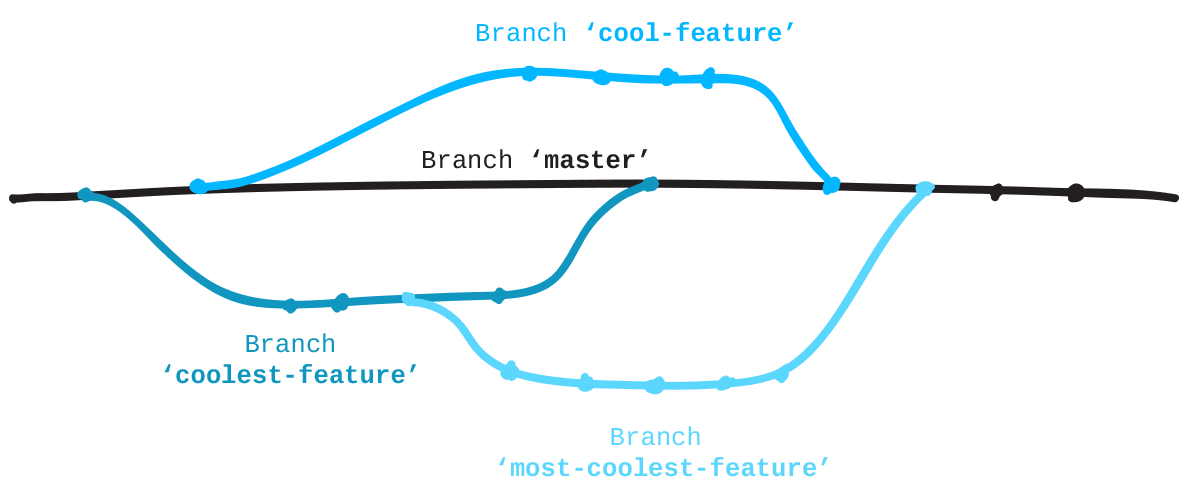
Merging feature branches into the main branch is a crucial step in the collaborative development process. It consolidates code changes, introduces new functionalities, and ensures that the latest developments are integrated seamlessly into the primary codebase. Proper merging practices help maintain code integrity, prevent conflicts, and support a smooth workflow among team members.
Understanding different merging strategies and effectively resolving conflicts are vital skills for developers managing multiple feature branches. These techniques enable teams to choose the most appropriate method based on project requirements, workflow preferences, and the complexity of changes involved.
Merging Methods for Feature Branches into Main
There are primarily two methods to merge feature branches into the main branch: fast-forward and no-ff (no fast-forward). Each technique serves different purposes and impacts the project history differently.
Fast-forward merges are straightforward and preserve a linear project history. They occur when the main branch has not diverged since the feature branch was created. In this case, Git simply moves the main branch pointer forward to the latest commit of the feature branch. This method results in a cleaner history but can obscure the fact that a feature was developed separately.
No-ff merges create a new commit even if a fast-forward is possible. This approach maintains the branch point in the commit history, clearly indicating when a feature was integrated. It is especially useful for preserving the context of feature development and facilitating easier rollbacks if needed.
Comparing Merge Strategies: Fast-Forward vs. No-FF
The choice between fast-forward and no-ff merging strategies depends on the project’s workflow and the importance placed on commit history clarity. The following comparison highlights key differences:
| Aspect | Fast-Forward | No-FF |
|---|---|---|
| History Clarity | Linearly reflects feature integration; can obscure branch point | Maintains explicit branch point; clearer feature boundaries |
| Workflow Suitability | Ideal for small, incremental updates without complex branching | Better for significant features or when tracking branch origins is important |
| Merge Commit | Not created; the branch pointer moves directly to the feature commit | Creates a dedicated merge commit, preserving branch history |
Resolving Conflicts During Merges
Conflicts are common during merges when Git detects incompatible changes between branches. Effective conflict resolution ensures smooth integration and maintains code stability. The process involves identifying conflicting files, understanding the conflicting changes, and manually editing the files to reconcile differences.
Consider an example where a developer merges a feature branch into the main branch, but both branches have modified the same function differently. Git will mark the conflict within the file, highlighting the divergent sections with conflict markers like:
<<<<<<< HEAD
function calculateTotal()
return subtotal + tax;=======
function calculateTotal()
return subtotal + tax + discount;>>>>>>> feature-branch
In this scenario, the developer must decide whether to include the discount calculation or not. After editing the file to resolve the conflict, the changes need to be staged using git add. Once all conflicts are resolved, a commit can be completed to finalize the merge. Proper conflict resolution preserves the integrity of the codebase and ensures that the integrated features behave as expected.
Rebase and Cherry-Pick Operations
Rebase and cherry-pick are powerful Git operations that allow for more flexible and controlled management of changes across branches. They help maintain a cleaner project history and enable precise integration of specific commits, streamlining the development workflow and reducing merge conflicts.Rebasing involves integrating updates from one branch, typically the main branch, onto another feature branch. Cherry-picking, on the other hand, allows for selecting specific commits from one branch and applying them to another, regardless of their position in the commit history.
Both techniques are essential for optimizing feature development and managing complex workflows efficiently.
Rebasing Feature Branches onto the Latest Main Branch
Rebasing is a technique used to update a feature branch with the latest changes from the main branch, ensuring that the feature branch remains current and compatible with the main development line. This process is especially useful before merging a feature branch back into the main branch, as it helps minimize integration conflicts and produce a linear, easy-to-follow history.The typical procedure involves the following steps:
- Switch to the feature branch that needs updating:
git checkout feature-branch - Rebase the feature branch onto the latest main branch:
git rebase main - If conflicts arise during rebasing, resolve them manually, then continue:
git rebase --continue - Once rebasing is complete, the feature branch contains all the latest changes from main, which can now be tested and merged back seamlessly.
It is important to note that rebasing rewrites the commit history of the feature branch. Therefore, rebasing should be avoided on public branches that other collaborators are working on unless coordinated properly, to prevent disrupting others’ workflows.
Cherry-Picking Specific Commits from Other Branches
Cherry-picking allows for the selective application of individual commits from one branch to another. This operation is particularly useful when a specific fix, feature, or change is needed in a different branch without merging all the unrelated history from the source branch.The process involves:
- Identify the commit hash of the change to be cherry-picked. This can be obtained by running:
git log --oneline - Switch to the target branch where the commit will be applied:
git checkout target-branch - Execute the cherry-pick command with the commit hash:
git cherry-pick
In case of conflicts during cherry-picking, resolve them manually, then continue with:
git cherry-pick --continue
Cherry-picking is especially advantageous in scenarios such as applying critical bug fixes from development to release branches or selectively porting features without merging entire development histories. It offers precision in managing code changes across multiple branches, minimizing unnecessary merge commits and maintaining a clean project history.
Managing Multiple Features with Branches
Effectively managing multiple features within a Git repository requires a structured approach to branching. By organizing various feature branches simultaneously, teams can maintain clarity, reduce conflicts, and streamline development workflows. This approach is particularly critical in collaborative environments where multiple developers work on different aspects of a project concurrently.
Proper management of multiple feature branches involves adopting consistent naming conventions, understanding dependencies among features, and implementing strategies to oversee the progression and integration of these branches. This ensures a smooth development process, minimizes integration issues, and facilitates clear communication across the team.
Organizing Multiple Feature Branches
When handling several features simultaneously, it is essential to establish an organized structure that allows quick identification and management of each branch. Clear organization helps prevent confusion, overlapping work, and merge conflicts. The strategy usually involves creating dedicated branches for each feature based on a common base branch, typically main or develop.
In practice, teams often create individual branches named after the specific feature or task, such as feature/user-authentication, feature/payment-integration, or feature/ui-redesign. These naming conventions promote clarity and enable team members to quickly locate and work on relevant features without ambiguity.
Best Practices for Naming Conventions
Consistent and descriptive naming conventions are vital for managing multiple feature branches effectively. They aid in tracking progress, understanding the purpose of each branch, and identifying dependencies. Common conventions include:
| Prefix | Description | Example |
|---|---|---|
| feature/ | Indicates a new feature being developed. | feature/user-authentication |
| bugfix/ | Addresses specific bugs or issues. | bugfix/login-error |
| hotfix/ | Critical fixes for production issues. | hotfix/payment-gateway |
| release/ | Preparation for a new release. | release/v1.2.0 |
Using consistent naming conventions simplifies branch management, accelerates onboarding, and enhances collaboration across teams.
Handling Dependencies Between Features
Dependencies between features are a common challenge when managing multiple branches. Some features may rely on others being completed or integrated first, necessitating careful planning and coordination. Proper handling of these dependencies ensures smooth integration and minimizes conflicts during merging processes.
Strategies to manage feature dependencies include:
- Creating feature branches based on the latest
developormainbranches to include the most recent updates. - Using
feature flagsto toggle features on or off without merging incomplete functionalities into the main codebase. - Implementing regular synchronization by rebasing feature branches onto the latest version of the base branch, minimizing integration issues.
- Documenting dependencies explicitly, so team members understand the order of development and integration needs.
Additionally, when a feature depends on another, it is advisable to incorporate changes from the dependent branch into the feature branch early, either by merging or rebasing, to resolve conflicts and ensure compatibility.
Collaboration and Pull Requests
Effective collaboration in software development relies heavily on the use of branches and pull requests within version control systems like Git. Pull requests serve as a formal mechanism for team members to review, discuss, and approve changes before integrating them into the main codebase. This process ensures code quality, knowledge sharing, and streamlined teamwork, especially in distributed development environments.Pull requests facilitate transparent and organized collaboration by allowing team members to examine proposed changes, provide feedback, and suggest improvements.
They act as collaborative checkpoints where developers can validate functionality, style adherence, and overall design aspects before merging. This structured approach minimizes conflicts, promotes consistent coding standards, and enhances the reliability of the software.
Collaborating Using Branches via Pull Requests
The use of branches in conjunction with pull requests establishes a structured workflow for collaborative development. Developers create feature branches from the main branch to implement new functionalities or fixes independently, reducing risks to the stable codebase. Once the work on a feature branch is complete, a pull request is initiated to merge these changes back into the main branch.
This process enables team members to review and discuss the proposed changes in a dedicated environment before they become part of the official project.The pull request acts as a central hub for collaboration, where team members can comment on specific lines of code, ask for clarifications, and suggest modifications. This facilitates a peer review culture that enhances code quality and team cohesion.
Automated tools for continuous integration (CI) can be integrated to run tests and checks automatically before approval, ensuring that only validated changes are merged.
Steps to Review, Comment, and Approve Feature Branches
A systematic review process is crucial for maintaining high standards in collaborative projects. The key steps include:
- Initiate a Pull Request: Once feature development is complete, the developer submits a pull request referencing the feature branch to the target branch, typically ‘main’ or ‘develop’.
- Perform a Code Review: Reviewers examine the proposed changes thoroughly, focusing on code quality, functionality, adherence to standards, and potential impacts. They can leave comments on specific lines or sections to request clarifications or improvements.
- Discuss and Iterate: The development team discusses the comments, suggests modifications, and the author updates the branch accordingly. Multiple iterations may occur during this phase.
- Testing and Validation: Automated tests, static analysis, and manual testing are performed to verify the changes meet quality criteria.
- Approve the Changes: Once reviews are satisfactory and tests pass, reviewers approve the pull request, signaling readiness for merging.
Best Practices for Integrating Feedback Before Merging
Effective integration of feedback enhances code quality and team collaboration. The following best practices facilitate this:
- Address All Comments: Ensure that all review comments are addressed comprehensively. This might involve code adjustments, additional testing, or clarifications.
- Maintain Clear Communication: Keep open lines of communication with reviewers, asking questions when feedback is unclear and providing explanations for design choices.
- Update the Feature Branch: Incorporate feedback iteratively by committing changes to the feature branch, ensuring the pull request reflects the most recent modifications.
- Re-run Automated Checks: After updates, rerun CI pipelines to verify that the feedback implementation does not introduce errors or regressions.
- Perform Final Manual Testing: Conduct additional testing, particularly for complex features, to confirm that feedback has been effectively integrated without affecting existing functionality.
“A disciplined review process not only improves code quality but also fosters a culture of continuous learning and collaboration.”
Best Practices for Branch Management
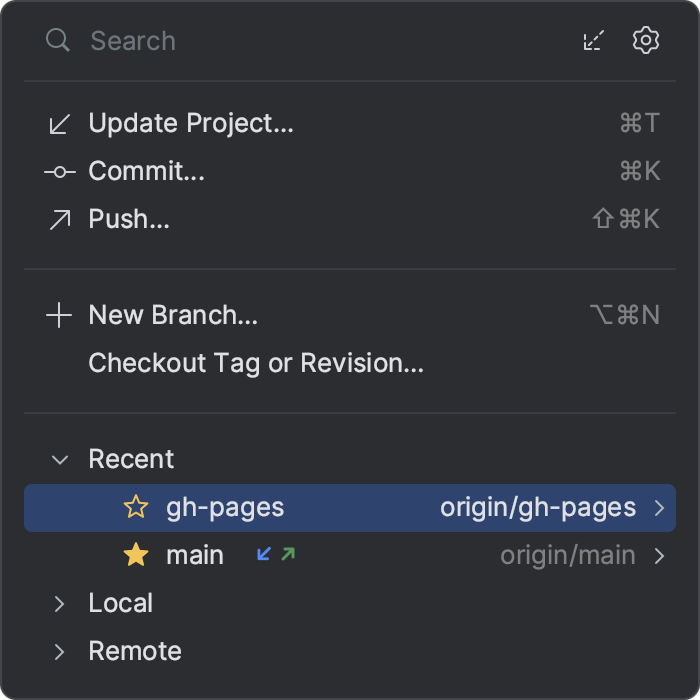
Maintaining a well-organized and efficient branch management strategy is essential for both individual developers and collaborative teams. Proper practices help prevent confusion, reduce errors, and streamline the development process, especially as projects grow in complexity. Adhering to established guidelines ensures that branches serve their intended purpose, and that the repository remains clean and manageable over time.Effective branch management involves the implementation of clear naming conventions, systematic tagging, and disciplined procedures for archiving obsolete branches.
These practices not only facilitate smoother workflows but also enhance collaboration among team members by providing clarity and consistency in version control. Establishing such best practices early in the development lifecycle fosters a disciplined environment conducive to continuous integration and deployment.
Maintaining Clean and Organized Branches
A structured approach to creating and managing branches contributes significantly to project clarity. It is advisable to adopt consistent naming conventions that reflect the purpose and scope of each branch, such as feature/, bugfix/, release/, or hotfix/ prefixes. This makes it easier to identify the role of each branch at a glance and to filter or locate specific branches efficiently.Regularly reviewing and deleting branches that have been merged or are no longer active helps prevent clutter within the repository.
Implementing policies to delete obsolete branches after successful merges minimizes confusion and reduces the risk of working on outdated code. Additionally, utilizing protected branches for critical or stable code ensures that important branches are only updated through controlled procedures like pull requests, thereby maintaining integrity.
Tagging and Versioning Related to Feature Releases
Proper tagging and versioning practices are vital for tracking releases, hotfixes, and significant milestones within a project. Tags serve as fixed points in the repository’s history, often indicating specific release versions, which simplifies rollback procedures and historical audits. A systematic approach to tagging ensures consistency and clarity, especially in environments where multiple releases are managed simultaneously.It is recommended to adopt semantic versioning (SemVer), which encodes the nature of changes within version numbers.
For example, a version number like v2.3.1 indicates the second major release, with minor updates and patches. Creating lightweight, annotated tags for each release provides additional context, including release notes and metadata, which is valuable for both development and deployment teams. Labels such as “release-1.0.0” or “hotfix-2024-04-15” can be used to denote specific milestones clearly.
Archiving or Deleting Obsolete Branches
Managing obsolete branches involves establishing procedures for archiving or deleting branches that are no longer needed. Archiving branches is useful when there is a possibility of future reference or when the branch contains valuable historical context, but active development has ceased. Creating a dedicated archive branch or tag for such code preserves the history without cluttering the active workspace.Conversely, deleting unused branches helps to maintain repository hygiene and reduces cognitive load during daily workflows.
Before deletion, it is important to verify that the branch has been fully merged into the main development line, such as the main or develop branch, to prevent loss of valuable work. Utilizing branch protection rules and peer review processes can prevent accidental deletions, ensuring that only branches confirmed as obsolete are removed. In collaborative settings, communicating branch deletions clearly and documenting the reasons enhances transparency and team understanding.
Last Point
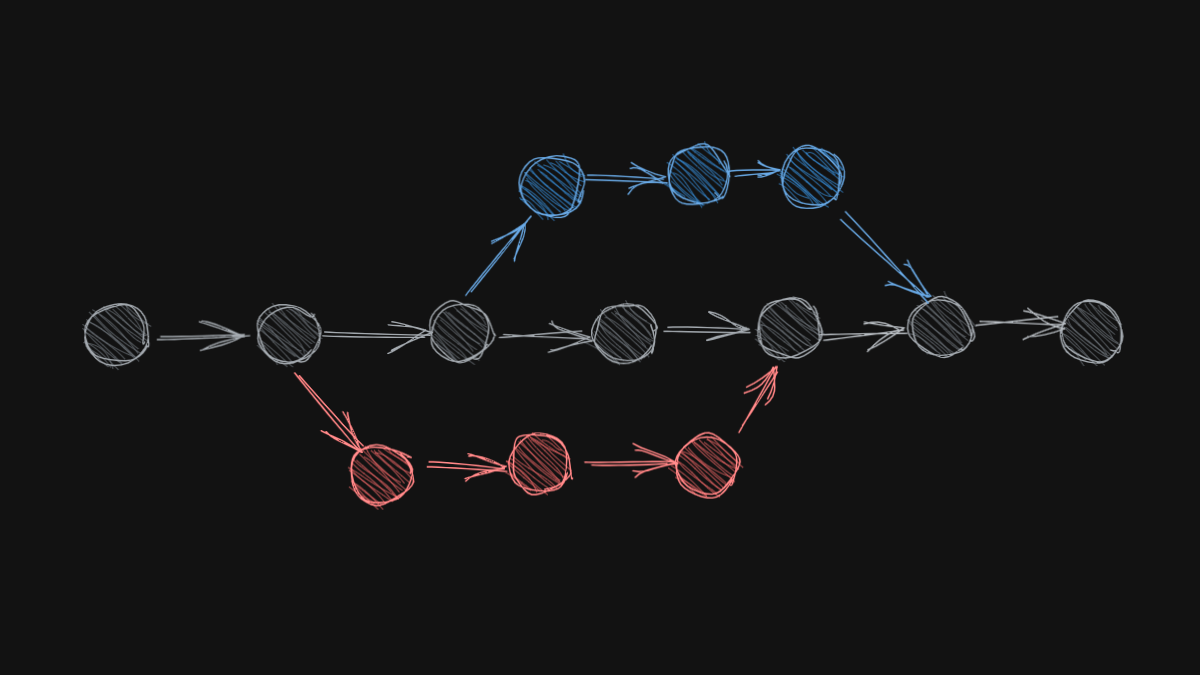
In conclusion, leveraging git branches effectively empowers development teams to manage multiple features with clarity and precision. By adopting best practices for branch creation, merging, and collaboration, projects can achieve smoother workflows and higher-quality releases, making feature management a seamless part of the development lifecycle.