Embarking on a journey to master JavaScript within just one month can be both exciting and rewarding. With a well-structured plan and dedicated effort, you can develop a solid foundation in this versatile programming language in a short period. This guide offers practical strategies, essential concepts, and hands-on projects designed to help you achieve your goal efficiently and effectively.
By following an organized learning roadmap that balances theory, practice, and review, you’ll be able to grasp core JavaScript fundamentals, utilize useful tools and libraries, and overcome common challenges along the way. Whether you’re a beginner or looking to refresh your skills, this comprehensive approach aims to accelerate your learning process and build confidence in coding.
Establishing a Learning Roadmap for JavaScript in One Month
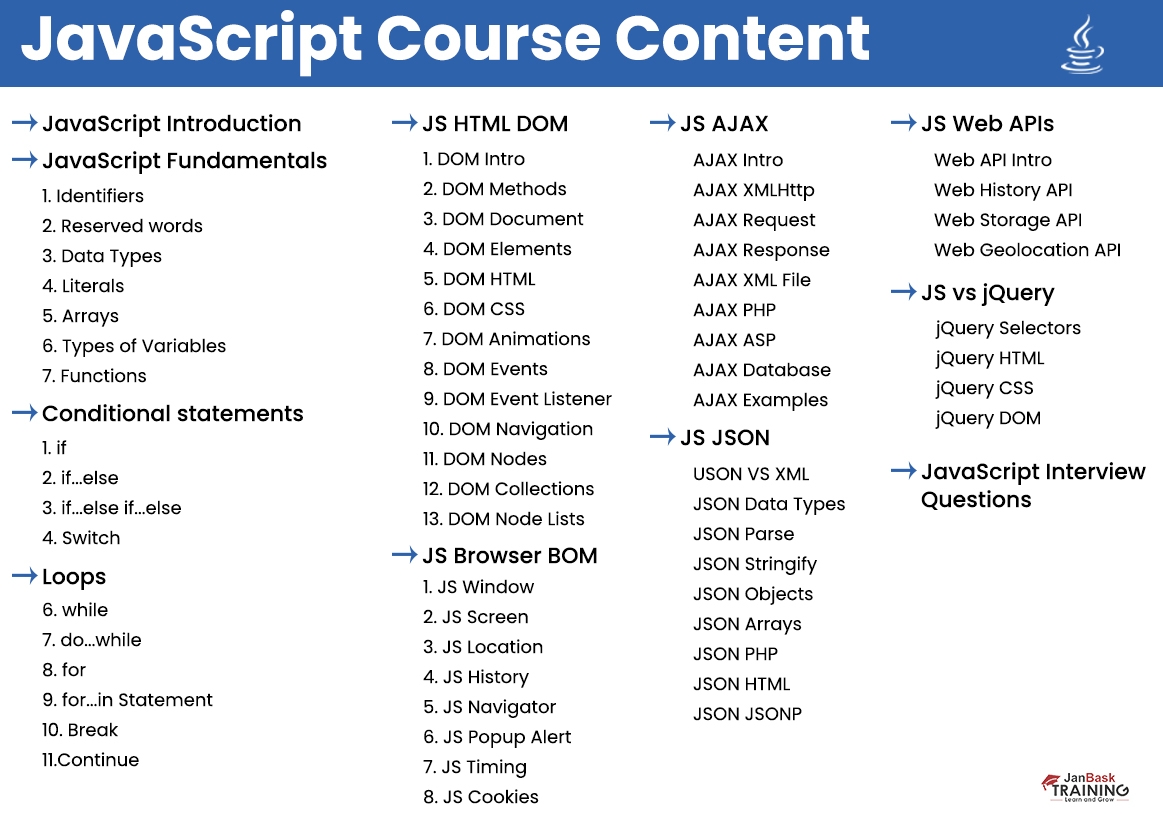
Embarking on a one-month journey to master JavaScript requires a well-structured and strategic learning plan. By establishing a clear roadmap, learners can systematically cover essential concepts, allocate sufficient time for practice, and track their progress effectively. This approach ensures that the learning process remains focused, efficient, and achievable within the limited timeframe, leading to a solid foundational understanding of JavaScript that can be built upon in subsequent studies or projects.To optimize the one-month learning experience, it is crucial to organize topics into weekly milestones, set specific daily objectives, and balance theoretical knowledge with practical application.
Incorporating regular review sessions enables reinforcement of concepts, while dedicated practice days allow for hands-on coding that cements understanding. A thoughtfully designed roadmap acts as a guiding framework, reducing overwhelm and promoting consistent progress toward mastering JavaScript basics.
Weekly Schedule with Essential Topics and Milestones
A comprehensive weekly plan helps learners focus on key areas, ensuring coverage of fundamental topics while building momentum. Each week should aim to introduce core concepts, provide practice opportunities, and mark clear milestones to assess progress.
| Week | Topics Covered | Milestones |
|---|---|---|
| Week 1 |
|
Ability to write simple scripts, understand syntax, and execute basic control flows |
| Week 2 |
|
Develop a small interactive webpage component, demonstrate event handling and object usage |
| Week 3 |
|
Implement asynchronous data fetching example; organize code into modules |
| Week 4 |
|
Complete a mini-project demonstrating core skills; prepare a learning reflection and next steps plan |
Daily Learning Objectives Focused on Core Concepts
Daily objectives ensure consistent progress by breaking down broad topics into manageable, focused sessions. This structure helps learners dedicate attention to specific concepts, reinforce understanding through practice, and avoid feeling overwhelmed.To maximize retention, each day should include:
- Brief theoretical review: understanding the purpose and syntax of new concepts
- Hands-on coding exercises: implementing what was learned through small projects or examples
- Short review sessions: revisiting previous topics to reinforce memory
- Reflection or journaling: summarizing key takeaways and areas needing clarification
For example, a typical week might look like:
Day 1
Variables and Data Types – Practice declaring variables, experimenting with different data types
Day 2
Control Structures – Write scripts using if-else, switch, loops
Day 3
Functions – Create various functions, explore scope and parameter usage
Day 4
Arrays and Objects – Manipulate collections, iterate, and access data
Day 5
DOM Manipulation – Build interactive features for a webpage
Day 6
ES6 Features – Incorporate modern syntax into previous exercises
Day 7
Review and Mini Project – Combine concepts into a small app or script, identify gaps
Structured Balance of Theory, Practice, and Review
An effective learning plan balances theoretical understanding with practical programming exercises and regular review sessions. This approach ensures concepts are not only learned but also retained and applied confidently.Implementing this balance involves:
“Spend approximately 40% of your time on studying new concepts, 40% on coding exercises, and 20% on review and consolidation.”
Begin each day with a brief theoretical overview, followed by immediate practice through coding challenges or projects. Allocate time at the end of each day to revisit previous lessons, clarify doubts, and reinforce learning. Weekly review sessions or mini-projects help synthesize knowledge, ensuring that learners can connect concepts and apply them effectively.This structured approach prevents cognitive overload, promotes active learning, and fosters skill retention—key factors for successfully mastering JavaScript in a limited timeframe.
Core JavaScript Concepts and Fundamentals
Mastering the foundational concepts of JavaScript is essential for building a solid programming base. This section covers the key elements such as variables, data types, scope, functions, control structures, objects, arrays, and basic algorithms. Understanding these core topics will enable you to write efficient and effective JavaScript code, paving the way for more advanced topics and projects.
By grasping these fundamentals, learners can develop the ability to manipulate data, create reusable code, control program flow, and structure complex data models. These skills are crucial for developing interactive web applications, handling user input, and implementing logic that responds dynamically to different scenarios.
Variables, Data Types, and Scope
Variables serve as containers for storing data that can be manipulated throughout the program. JavaScript provides three primary ways to declare variables: var, let, and const. Understanding their differences, especially in terms of scope and mutability, is vital for writing predictable code.
JavaScript supports several data types including primitive types such as Number, String, Boolean, Null, Undefined, and Symbol, as well as complex types like Object and Array.
Variables declared with
varare function-scoped, whileletandconstare block-scoped. This means that variables declared within a block (e.g., inside anifstatement) usingletorconstare not accessible outside that block, reducing potential bugs related to variable hoisting and scope leakage.
Functions, Conditionals, and Loops
Functions are the fundamental building blocks for organizing code into reusable and manageable units. JavaScript supports function declarations, expressions, and arrow functions, each serving different scenarios and styles of coding.
Conditional statements such as if, else if, else, and switch allow programs to make decisions based on data. Loops like for, while, and do...while enable repetition, which is essential for processing collections, performing calculations, or automating tasks.
| Construct | Description | Example |
|---|---|---|
| Function Declaration | Defines a named function that can be called elsewhere |
|
| Conditional (if) | Executes code based on a condition |
|
| For Loop | Repeats a block a specific number of times |
|
Objects, Arrays, and Basic Algorithms
Objects and arrays are vital data structures in JavaScript, used to model complex data and collections. Objects store data as key-value pairs, enabling developers to represent real-world entities, while arrays organize ordered data, facilitating iteration and manipulation.
Understanding basic algorithms like searching and sorting helps optimize data handling and processing. These algorithms form the backbone of many applications, from simple data filtering to complex computations.
| Data Structure | Description | Example |
|---|---|---|
| Object | Key-value pairs representing entities |
|
| Array | Ordered list of items |
|
Common algorithms include linear search, binary search, and sorting methods like bubble sort and quicksort. For example, linear search iterates through each element to find a match, which is simple but less efficient for large datasets, whereas binary search requires sorted data but performs faster.
Linear Search Algorithm:
for (let i = 0; i < arr.length; i++)
    if (arr[i] === target)
        return i; // Found at index i


return -1; // Not found
Practical Learning Strategies and Techniques
Mastering JavaScript within one month requires more than just understanding concepts; it demands the adoption of effective strategies for writing, debugging, and solving problems efficiently. Employing structured approaches enhances the retention of knowledge, accelerates skill development, and builds confidence in real-world coding scenarios. This section explores practical methods to optimize your learning process, leverage online resources, and organize your study efforts for maximum impact.
Implementing targeted learning techniques can significantly improve your ability to develop clean, functional code while swiftly identifying and correcting errors. Additionally, utilizing a variety of online tutorials, documentation, and community forums provides diverse perspectives and problem-solving approaches. Maintaining organized notes and summaries reinforces understanding and facilitates quick revision, ensuring continuous progress throughout your one-month JavaScript journey.
Effective Code Writing, Debugging, and Problem-Solving
Engaging actively with coding exercises and real projects is crucial for translating theoretical knowledge into practical skills. Focus on writing small, manageable code snippets daily, which helps in grasping core JavaScript concepts and syntax. As you code, pay attention to clarity and simplicity, avoiding overly complex solutions that can hinder debugging and learning.
Debugging is an essential skill that improves with practice. Use browser developer tools extensively to inspect elements, monitor console logs, and step through code execution. Learning to read error messages carefully and understanding their causes accelerates problem resolution. Implement strategies such as:
- Adding console.log statements at crucial points to trace variable values and code flow.
- Commenting code segments to clarify logic and facilitate future revisions.
- Breaking down complex functions into smaller, testable parts.
Emphasize problem-solving by approaching challenges systematically. Break problems into smaller sub-tasks, write pseudocode to plan logic, and test each part individually. Leveraging online coding platforms that offer immediate feedback, such as CodePen, JSFiddle, or freeCodeCamp, allows you to refine your solutions efficiently and learn from others’ approaches.
Utilizing Online Resources, Tutorials, and Documentation
Maximizing the wealth of online resources is vital for a comprehensive learning experience. Start with reputable platforms such as MDN Web Docs, which provide in-depth, up-to-date documentation on JavaScript fundamentals and advanced topics. Supplement this with video tutorials from trusted educators on platforms like YouTube, Udemy, or Coursera, which often include hands-on projects that reinforce learning.
Engage with online communities such as Stack Overflow, Reddit’s r/learnjavascript, or developer forums to seek guidance, clarify doubts, and observe common pitfalls faced by learners. These communities foster collaborative problem-solving and expose you to different coding styles and solutions. Additionally, utilize interactive coding exercises and challenges like HackerRank or LeetCode, which sharpen problem-solving skills and improve coding fluency.
Organization of Notes, Summaries, and Revision
Structured note-taking enhances retention and serves as a quick reference during revision. Use digital tools like Notion, Evernote, or markdown files to organize concepts, code snippets, and common pitfalls systematically. Categorize notes into core topics such as variables, functions, loops, and asynchronous programming for easy navigation.
Summarizing key points after each study session consolidates understanding and highlights areas needing further review. Employ visual aids such as mind maps or flowcharts to depict relationships between concepts, which facilitates holistic comprehension. Regular revision of notes—preferably weekly—ensures retention and helps identify gaps in knowledge, allowing targeted revision to reinforce learning.
Effective learning is a combination of consistent practice, strategic resource utilization, and organized note-taking, which collectively accelerates mastery of JavaScript within a limited timeframe.
Hands-on Projects and Coding Exercises
Engaging with practical projects and exercises is essential for transforming theoretical knowledge into real-world skills. By actively building small applications and solving coding challenges, learners reinforce their understanding of JavaScript concepts, improve problem-solving abilities, and gain confidence in their programming skills. This hands-on approach accelerates learning and prepares aspiring developers for more complex tasks in their coding journey.Practical projects and exercises serve as a bridge between learning syntax and applying it effectively.
They allow learners to experiment with code, troubleshoot issues, and see immediate results, fostering an intuitive grasp of JavaScript's capabilities. Incorporating varied mini-projects and challenges ensures a comprehensive understanding and keeps the learning process engaging and dynamic.
Designing Small Projects to Reinforce Skills
Creating small, focused projects helps consolidate core JavaScript concepts such as DOM manipulation, event handling, data management, and basic algorithms. Projects like a simple to-do list or calculator are ideal starting points because they are manageable yet cover multiple key functionalities.
- To-Do List Application: Build an interactive web app where users can add, delete, and mark tasks as completed. This project emphasizes DOM manipulation, event listeners, and local storage for data persistence.
- Calculator: Develop a calculator that performs basic arithmetic operations. Focus on handling user input, updating the display dynamically, and managing calculation logic.
- Real-time Search Filter: Create a list filtering feature that dynamically narrows down items based on user input, showcasing event handling and string filtering techniques.
- Quiz App: Design a multiple-choice quiz that displays questions and scores results at the end, emphasizing control flow, event handling, and dynamic content updates.
Step-by-Step Procedures for Building Interactive Web Components
Implementing interactive components requires a structured approach to ensure clarity and functionality. Here is a general procedure for creating a dynamic web feature, such as a toggle button or a live counter:
- Define the HTML Structure: Create the necessary HTML elements, like buttons, input fields, or display areas, to serve as the interface for interaction.
- Style the Components: Apply CSS to enhance visual appeal and user experience, ensuring elements are clearly visible and accessible.
- Add Event Listeners: Use JavaScript to attach event listeners to elements to detect user actions such as clicks, input, or hover events.
- Implement Functionality: Write functions that execute upon events, updating the DOM or internal data accordingly. For example, incrementing a counter or toggling visibility.
- Test and Refine: Run the component in various scenarios to ensure proper functionality, making adjustments for edge cases and usability improvements.
Each step should be accompanied by debugging and iterative testing to ensure seamless interaction and responsiveness, which are crucial for user engagement and application reliability.
Types of Exercises, Challenges, and Mini-Projects
Diverse exercises and challenges help solidify understanding through practical problem-solving. These activities range from simple syntax drills to comprehensive mini-projects that simulate real-world applications.
- Code Katas: Short, focused exercises that target specific concepts, such as array methods, loops, or conditional statements. For example, reverse a string or find duplicates in an array.
- Algorithm Challenges: Solve problems involving sorting, searching, or recursion, which sharpen logical thinking and algorithmic skills. Platforms like HackerRank or LeetCode provide practical scenarios for these challenges.
- Mini-Web Applications: Build small projects like a weather app, digital clock, or note-taking tool. These projects incorporate multiple JavaScript features and help learners develop a portfolio.
- UI/UX Enhancements: Improve existing projects by adding animations, responsiveness, or accessibility features, fostering a more comprehensive understanding of front-end development.
Engaging consistently with these exercises and mini-projects encourages experimentation and innovation. It transforms theoretical knowledge into practical mastery, preparing learners for more ambitious projects and professional development in JavaScript programming.
Tools, Libraries, and Development Environment Setup

Establishing an effective development environment is crucial for efficient learning and coding in JavaScript. Proper tools, libraries, and environment configurations streamline the workflow, reduce errors, and enhance productivity. For beginners aiming to master JavaScript within a month, setting up a robust and user-friendly development setup forms the foundation for practical learning and experimentation.
This section provides guidance on selecting suitable code editors, configuring browsers and developer tools, comparing popular JavaScript libraries and frameworks tailored for newcomers, and understanding fundamental version control and project organization techniques. Building familiarity with these tools early on enables smoother progression through learning milestones and encourages best practices from the outset.
Code Editors, Browsers, and Developer Tools Setup
Choosing an appropriate code editor is essential for writing clean, efficient JavaScript code. Popular options such as Visual Studio Code (VS Code), Sublime Text, and Atom offer extensive plugin support, syntax highlighting, debugging capabilities, and customizable interfaces tailored for JavaScript development.
For beginners, VS Code stands out due to its user-friendly interface, integrated terminal, and rich ecosystem of extensions like ESLint for code linting, Prettier for formatting, and Live Server for instant previewing. Installing a code editor involves downloading the installer from the official website and customizing preferences such as theme, font size, and keybindings to enhance comfort and productivity.
Configuring web browsers, especially Chrome or Firefox, with developer tools is equally vital. These tools facilitate real-time debugging, inspecting HTML/CSS, monitoring network requests, and testing JavaScript execution. Accessing developer tools typically involves pressing F12 or right-clicking the webpage and selecting "Inspect," which opens a panel with multiple tabs for detailed analysis and troubleshooting.
Browser Developer Tools are indispensable for identifying issues during development, profiling performance, and understanding how scripts interact with web pages.
Comparison of Popular JavaScript Libraries and Frameworks for Beginners
Integrating libraries and frameworks accelerates JavaScript learning by providing pre-built functionalities, consistent coding patterns, and extensive community support. For beginners, selecting the right tools depends on the project scope, ease of learning, and long-term adaptability.
| Library/Framework | Ease of Learning | Use Cases | Pros | Cons |
|---|---|---|---|---|
| jQuery | Very beginner-friendly; simplifies DOM manipulation | Basic interactive features, simple animations, event handling | Reduces cross-browser issues, extensive plugin ecosystem | Less relevant for modern frameworks, added dependency |
| React | Moderate; component-based architecture suitable for those familiar with JavaScript ES6+ | Building dynamic, single-page applications, reusable UI components | Large community, strong backing by Facebook, flexible architecture | Steeper learning curve initially, requires understanding of JSX |
| Vue.js | Gentle learning curve, intuitive syntax | Progressive framework for developing interactive interfaces | Easy to integrate, comprehensive documentation, reactive data binding | Smaller ecosystem compared to React, less corporate backing |
For absolute beginners, starting with jQuery offers quick wins in understanding DOM manipulation and event handling. As familiarity grows, transitioning to React or Vue.js can facilitate the development of scalable, modern web applications with more structured architectures and component-based design patterns.
Version Control and Project Organization Basics
Implementing version control from the outset fosters good development habits, enabling tracking of code changes, collaboration, and rollback capabilities. Git is the most popular version control system, and platforms like GitHub or GitLab offer remote repositories for project management and collaboration.
Setting up a Git repository involves initializing a local repository within the project folder using the command git init, followed by staging and committing changes with git add and git commit. Pushing the repository to a remote service allows synchronization and sharing of code with collaborators or for backup purposes.
Organizing projects into a clear directory structure—such as separating source files, assets, and documentation—simplifies navigation and maintenance, especially as projects grow in complexity.
Adopting a consistent naming convention for files and folders, maintaining clean commit messages, and regularly updating the repository are key practices. These fundamentals not only streamline the learning process but also prepare aspiring developers for collaborative coding environments and professional workflows.
Efficient Time Management and Motivation
Embarking on an intensive one-month JavaScript learning journey demands not only dedication but also strategic management of your time and motivation levels. Proper planning ensures you stay on track, prevent burnout, and maintain enthusiasm throughout the process. Cultivating these habits transforms a challenging goal into an achievable milestone by fostering consistency and resilience.
Effective time management paired with sustained motivation enhances learning efficiency, allowing you to absorb concepts deeply while balancing other responsibilities. By organizing your daily routines and employing motivational techniques, you establish an environment conducive to continuous growth and confidence building in your programming skills.
Maintaining Focus and Avoiding Burnout During Intensive Learning
Intensive learning sessions can be taxing both mentally and physically. To sustain focus and prevent burnout, it is essential to implement strategies that recharge your energy and keep your mind engaged.
- Set clear, achievable daily goals that break down the overall learning roadmap into manageable tasks, preventing overwhelm and providing a sense of accomplishment with each milestone.
- Integrate regular breaks into your study schedule, such as the Pomodoro Technique, which involves focused 25-minute work sessions followed by 5-minute breaks. After four cycles, take a longer 15-30 minute break. This approach maintains mental agility and reduces fatigue.
- Ensure adequate sleep, balanced nutrition, and physical activity, as these are vital for cognitive function and overall well-being. A well-rested mind retains information more effectively and maintains higher levels of motivation.
Organizing Daily Routines and Study Blocks
Structured routines optimize learning by creating consistency and predictable habits. Allocating dedicated time slots for study and practice ensures comprehensive coverage of core topics while allowing flexibility for review and reinforcement.
- Prioritize your most alert hours of the day for challenging topics such as core JavaScript concepts or complex coding exercises. Use less demanding periods for review, light reading, or watching tutorials.
- Designate specific blocks of time, such as morning sessions for theory and late afternoon or evening for hands-on coding projects. Maintaining this routine helps establish discipline and reduces procrastination.
- Maintain a weekly schedule that includes time for reflection and progress assessment, enabling adjustments based on your evolving understanding and comfort level with the material.
Motivational Strategies and Progress Tracking
Keeping motivation high is crucial for sustained effort, especially during intensive learning periods. Employing measurable progress tracking methods and motivational techniques encourages persistence and celebrates achievements.
| Progress Tracking Method | Description |
|---|---|
| Daily Learning Journal | Maintain a journal to record what you learned each day, challenges faced, and solutions found. This reinforces knowledge and provides a visual record of progress. |
| Milestone Checklists | Break down your roadmap into milestone objectives, such as mastering functions or completing a project. Mark these off as you achieve them to boost morale. |
| Code Portfolio Updates | Regularly update a personal portfolio with completed exercises and projects. Visible progress fosters motivation and serves as tangible evidence of your growth. |
“Celebrating small victories along the way maintains enthusiasm and reinforces your commitment to learning JavaScript efficiently within a limited timeframe.”
Common Challenges and Troubleshooting
Learning JavaScript within a month presents an exciting challenge that can be highly rewarding with the right approach. However, learners often encounter specific obstacles that can slow their progress or lead to frustration. Recognizing these common issues and developing effective troubleshooting strategies are essential steps toward mastering JavaScript efficiently and confidently. This section aims to highlight typical hurdles faced during intensive learning, provide structured procedures for debugging errors, and share valuable tips for leveraging online communities to seek help effectively.JavaScript is a versatile language with a vast ecosystem, which can sometimes overwhelm beginners, especially when encountering complex errors or unfamiliar concepts.
Addressing these challenges requires a combination of patience, systematic analysis, and resourcefulness. Troubleshooting not only involves fixing bugs but also understanding the root causes of issues, preventing future errors, and becoming more self-sufficient in problem-solving.
Typical Obstacles Faced When Learning JavaScript in One Month
Mastering JavaScript in a condensed timeframe often leads to encountering specific difficulties, including conceptual confusion, syntax errors, asynchronous programming challenges, and debugging complexities. Common obstacles include:
- Understanding JavaScript’s core concepts: Grasping asynchronous behavior, closures, prototypes, and scope can be confusing initially, leading to misunderstandings that hinder progress.
- Syntax and runtime errors: Mistyped variables, missing semicolons, or incorrect function calls often produce errors that can be cryptic for beginners.
- Debugging and tracing errors: Identifying the source of bugs, especially in larger scripts, can be daunting without proper debugging techniques.
- Managing asynchronous code: Handling promises, async/await, and callback functions may cause logical errors or unexpected behavior if not well understood.
- Overcoming information overload: The vast amount of resources, libraries, and frameworks available can be overwhelming, leading to confusion about where to focus efforts.
Developing Troubleshooting Procedures for Debugging Errors
Effective debugging is a skill that significantly accelerates learning and project development. Structured troubleshooting procedures help identify issues quickly and systematically. The following approach can be adopted:
- Reproduce the error consistently: Ensure that the problem occurs reliably, which helps in isolating the specific conditions causing the error.
- Read the error messages carefully: JavaScript errors often include line numbers and descriptions. Pay close attention to these clues as they point directly to the problematic code segment.
- Utilize browser developer tools: Modern browsers like Chrome or Firefox provide powerful debugging consoles where you can inspect variables, set breakpoints, and step through code execution.
- Isolate code blocks: Simplify or comment out parts of the code to determine which section causes the issue, gradually narrowing down the source of the problem.
- Check syntax and logical flow: Use linters like ESLint or JSHint to detect syntax errors or potential issues before running code. Review logic especially around asynchronous operations or conditional statements.
- Use console.log() strategically: Insert logging statements before and after suspect code sections to monitor variable states and execution flow, making unseen issues more visible.
- Consult documentation and resources: When encountering unfamiliar errors, refer to official MDN Web Docs, JavaScript tutorials, or error code references for clear explanations and solutions.
- Test with minimal code: Break down complex code into smaller, testable units to identify the specific line or logic causing the error.
Tips for Seeking Help from Online Communities and Forums
Leveraging community support significantly enhances troubleshooting efficiency. When facing persistent issues, well-crafted inquiries can lead to faster and more accurate solutions. Here are some best practices:
- Prepare a clear, concise description of the problem: Include details such as the error message, relevant code snippets, and the context in which the issue occurs. Avoid vague descriptions.
- Share minimal, reproducible examples: Isolate the problematic code and present a simplified version that consistently reproduces the error, making it easier for others to diagnose.
- Use proper formatting and syntax highlighting: When posting in forums like Stack Overflow, format code snippets correctly to enhance readability.
- Research before asking: Search existing questions and answers to determine if the issue has been addressed already, saving time and avoiding duplicate queries.
- Engage politely and thank contributors: Show appreciation for assistance, fostering positive interactions that encourage ongoing support.
- Follow up with clarifications or additional details: If asked for more information, respond promptly and provide the requested data to facilitate accurate diagnosis.
- Join relevant communities: Participate in JavaScript-focused forums, Discord servers, or Reddit communities, where experienced developers can offer targeted advice.
"Effective troubleshooting combines systematic analysis, resourcefulness, and community engagement. Cultivating these skills accelerates your learning curve and builds confidence in solving complex problems."
Review and Self-Assessment Methods

Mastering JavaScript within a month requires consistent reflection on progress and understanding. Implementing effective review and self-assessment strategies ensures that knowledge is retained, misconceptions are addressed promptly, and gaps are filled efficiently. These methods help learners reinforce concepts, build confidence, and adapt their study plans to focus on areas needing improvement.Regular self-assessment is vital for transforming passive learning into active mastery.
By integrating structured review techniques, learners can gauge their comprehension, application skills, and retention levels. This process also fosters a proactive attitude towards problem-solving and continuous learning, essential traits for any successful developer.
Templates for Quizzes, Flashcards, and Coding Challenges
Effective self-assessment tools are the backbone of reviewing progress. Templates help organize knowledge, test understanding, and identify weak points systematically. Here are examples of practical templates:
- Quiz Template:
Question: _What is the primary purpose of the 'this' in JavaScript?_
Options:- a) To refer to the global object
- b) To refer to the current object context
- c) To declare a variable
- d) To define a function
Correct Answer: b) To refer to the current object context
- Flashcard Template:
Front: Explain the concept of closures in JavaScript.
Back: Closures are functions that retain access to their lexical scope even when executed outside that scope. They enable private variables and function factories. - Coding Challenge Template:
Challenge: Write a function that takes an array and returns a new array with only unique elements.
Constraints: Use ES6 syntax; optimize for performance.
Criteria for Evaluating Understanding and Retention
Establishing clear evaluation criteria helps learners objectively measure their progress. These criteria should encompass both theoretical knowledge and practical skills, providing a holistic view of mastery.
- Accuracy of Concepts: Ability to explain core concepts with clarity and precision, such as variables, functions, scope, and prototypes.
- Application Skills: Effectiveness in writing correct, efficient code during challenges and projects.
- Problem-Solving Ability: Speed and correctness when debugging or optimizing code snippets.
- Retention Over Time: Ability to recall key concepts and syntax after periods of review, tested through flashcards or self-quizzing.
- Progress Tracking: Documented improvements in quiz scores, code quality, and project complexity over the month.
Methods for Revisiting Difficult Topics and Consolidating Knowledge
Addressing challenging topics systematically enhances learning efficiency and prevents knowledge gaps from persisting. Effective methods include:
- Targeted Review Sessions: Dedicate specific sessions to revisit topics like asynchronous programming or closures that initially posed difficulties. Use comprehensive notes, tutorials, and example projects during these sessions.
- Spaced Repetition: Implement spaced repetition techniques with flashcards, gradually increasing intervals to reinforce memory of syntax, concepts, and best practices.
- Re-explanation and Teaching: Articulate complex topics in your own words or teach them to a peer. This technique deepens understanding and uncovers gaps in knowledge.
- Hands-on Practice: Revisit challenging problems by rewriting solutions, experimenting with variations, or extending existing code. Practical reinforcement cements theoretical understanding.
- Peer Collaboration and Feedback: Join coding communities or study groups to discuss difficult topics. Peer explanations and feedback often clarify misunderstandings and introduce new perspectives.
Final Wrap-Up

In conclusion, learning JavaScript in one month is an achievable goal when approached with a clear plan and consistent effort. By focusing on core concepts, engaging in practical exercises, and utilizing the right resources, you can make significant progress in a short time. Remember to stay motivated, manage your time wisely, and seek support from online communities to overcome obstacles and solidify your understanding.
Ultimately, this focused approach not only prepares you to build interactive web applications but also paves the way for further growth in the world of programming. Embrace the learning process with dedication, and you'll find yourself proficient in JavaScript before you know it.