Embarking on the journey of setting up load balancing for MySQL servers unlocks a realm of enhanced performance, unparalleled availability, and effortless scalability. This detailed guide unveils the intricacies of distributing database workloads across multiple servers, ensuring that your applications remain responsive and resilient, even under heavy traffic. From the fundamental principles to advanced techniques, we’ll explore the essential steps and strategies to fortify your MySQL infrastructure.
Our exploration will delve into various load balancing methods, scrutinizing their advantages and disadvantages, alongside a comparative analysis of popular software solutions such as HAProxy, MySQL Router, and ProxySQL. We’ll meticulously prepare your MySQL servers for load balancing, covering replication setup and crucial pre-requisites. Furthermore, we’ll walk through the installation and configuration of these load balancers, providing practical configuration snippets and architectural diagrams.
Finally, we’ll equip you with the knowledge to test, monitor, and troubleshoot your setup, while also addressing critical security considerations and advanced techniques.
Introduction to Load Balancing for MySQL Servers
Load balancing is a critical technique for ensuring the high availability, performance, and scalability of MySQL database deployments. It involves distributing incoming client requests across multiple MySQL server instances, preventing any single server from becoming overloaded and impacting application responsiveness. This ensures that the database system can handle a large volume of traffic without experiencing performance degradation or downtime.
Fundamental Concept of Load Balancing
Load balancing, in the context of MySQL, functions as a distribution mechanism. A load balancer acts as an intermediary, receiving client requests and then intelligently directing these requests to one of several MySQL server instances, also known as backend servers or database nodes. This distribution is typically based on factors like server capacity, current load, and health status. The primary goal is to evenly distribute the workload, preventing any single server from becoming a bottleneck.
If one server fails, the load balancer automatically redirects traffic to the remaining healthy servers, maintaining continuous service availability.
Why Load Balancing is Essential
Load balancing is crucial for several reasons related to MySQL server performance, availability, and scalability. It improves overall system performance by distributing the workload, reducing response times, and preventing server overload. Furthermore, it significantly enhances availability by providing redundancy. If one MySQL server goes down, the load balancer seamlessly redirects traffic to other available servers, minimizing downtime and ensuring continuous service.
Finally, load balancing facilitates scalability. As the demand on the database increases, additional MySQL server instances can be added to the load balancer, allowing the system to handle growing traffic volumes without performance degradation.
Common Scenarios for Load Balancing
Load balancing is particularly beneficial in several common MySQL deployment scenarios.The following list details some scenarios where load balancing provides substantial benefits:
- High-Traffic Websites and Applications: Websites and applications experiencing high traffic volumes can significantly benefit from load balancing. By distributing the database load across multiple servers, the system can handle a large number of concurrent user requests without performance degradation. For example, an e-commerce website during a major sale event, where traffic spikes dramatically, would rely heavily on load balancing to maintain a responsive user experience and prevent order processing delays.
- E-commerce Platforms: E-commerce platforms often require high availability and performance to handle transactions, product catalogs, and user accounts. Load balancing ensures that the database remains accessible and responsive even during peak shopping periods or unexpected server failures. A typical e-commerce platform with a large customer base and extensive product catalog would experience significant performance improvements through load balancing.
- Content Management Systems (CMS): CMS platforms, such as WordPress or Drupal, which manage large amounts of content and user interactions, can benefit from load balancing to ensure consistent performance and availability. Distributing the load across multiple database servers improves the speed of content delivery and management operations.
- Large-Scale Data Analytics: Applications involving data analytics and reporting often require extensive database resources. Load balancing allows for distributing query processing across multiple servers, accelerating the analysis and reporting processes. A financial institution processing large volumes of transaction data for reporting purposes would greatly benefit from this.
- Database Replication Environments: In environments where database replication is implemented (e.g., master-slave setups), load balancing can be used to distribute read queries across slave servers, reducing the load on the master server and improving overall read performance. This also ensures that the master server is not overloaded by read requests, allowing it to focus on write operations.
Understanding Different Load Balancing Methods
Load balancing is crucial for ensuring high availability, performance, and scalability of MySQL database deployments. Choosing the right load balancing method depends on various factors, including budget, infrastructure, and the specific needs of the application. This section explores different load balancing techniques available for MySQL servers, analyzing their advantages, disadvantages, and suitability for various scenarios.
DNS-Based Load Balancing
DNS-based load balancing leverages the Domain Name System (DNS) to distribute client requests across multiple MySQL server instances. This method involves configuring the DNS server to return different IP addresses for the same domain name, effectively routing traffic to different servers.
- How it Works: When a client attempts to connect to the database, it resolves the domain name to an IP address. The DNS server, configured with multiple A records (one for each MySQL server), responds with different IP addresses for each client request, either in a round-robin fashion or based on other configured algorithms.
- Advantages: DNS-based load balancing is relatively simple to set up and inexpensive, as it often requires no additional hardware or software beyond the DNS server. It’s a good starting point for basic load balancing needs.
- Disadvantages: DNS propagation delays can cause slow failover times. DNS-based load balancing is less sophisticated and doesn’t offer advanced health checks or session persistence. Furthermore, it lacks the ability to intelligently route traffic based on server load or other real-time metrics.
- Suitability: This method is suitable for small-scale deployments or situations where simplicity and cost-effectiveness are primary concerns. It might suffice for read-only replicas or environments where minimal downtime is acceptable.
Hardware-Based Load Balancing
Hardware-based load balancing utilizes dedicated hardware devices, such as load balancers from vendors like F5 Networks or Citrix, to distribute traffic across multiple MySQL servers. These devices offer advanced features, high performance, and robust health checks.
- How it Works: A hardware load balancer sits in front of the MySQL servers and intercepts all incoming client requests. It uses sophisticated algorithms to distribute the traffic, monitoring the health and performance of each server in real-time. If a server fails, the load balancer automatically redirects traffic to the remaining healthy servers.
- Advantages: Hardware load balancers offer high performance, advanced health checks, session persistence, and traffic management capabilities. They are designed for high availability and can handle large volumes of traffic. They provide more granular control over traffic distribution.
- Disadvantages: These solutions are typically the most expensive option, requiring the purchase and maintenance of specialized hardware. Configuration can be complex, and they might need specialized expertise to manage effectively.
- Suitability: Hardware load balancing is best suited for large-scale, high-traffic deployments where performance, reliability, and advanced features are critical. E-commerce websites, financial institutions, and other businesses that require high availability often use hardware load balancers.
Software-Based Load Balancing
Software-based load balancing utilizes software applications running on commodity hardware to distribute traffic across MySQL servers. Popular software load balancers include HAProxy, Nginx, and Apache with mod_proxy.
- How it Works: Software load balancers act as intermediaries between clients and the MySQL servers. They use various algorithms, such as round-robin, least connections, or IP hashing, to distribute traffic. They often include health checks to monitor the status of the servers and automatically reroute traffic in case of failures.
- Advantages: Software load balancers are generally less expensive than hardware-based solutions and offer greater flexibility and customization. They provide a good balance of features, performance, and cost. Many are open-source, reducing licensing costs.
- Disadvantages: Performance can be lower than hardware-based solutions, especially under heavy load. Configuration can be complex, and they require system administration expertise. They might require more manual intervention for scaling and maintenance.
- Suitability: Software load balancing is suitable for a wide range of deployments, from small to medium-sized businesses. It’s a cost-effective solution for environments where high performance is important, but the budget or complexity of hardware load balancers is prohibitive. It’s often used in cloud environments.
Comparison of Load Balancing Methods
The following table provides a comparative overview of the three load balancing methods discussed, highlighting their advantages, disadvantages, and suitability:
| Load Balancing Method | Advantages | Disadvantages | Suitability |
|---|---|---|---|
| DNS-Based | Simple to set up, Inexpensive | Slow failover, Limited features, Basic health checks | Small-scale deployments, Read-only replicas |
| Hardware-Based | High performance, Advanced features, Robust health checks | Expensive, Complex configuration, Requires specialized expertise | Large-scale, High-traffic deployments, High availability requirements |
| Software-Based | Cost-effective, Flexible, Customizable | Performance can be lower than hardware-based, Complex configuration, Requires system administration expertise | Small to medium-sized deployments, Cloud environments |
Choosing the Right Load Balancer Software
Selecting the appropriate load balancer software is crucial for the performance, scalability, and availability of your MySQL database infrastructure. The choice depends on various factors, including your specific requirements, budget, existing infrastructure, and the complexity of your database setup. This section will explore three popular software load balancers for MySQL: HAProxy, MySQL Router, and ProxySQL.
Popular Software Load Balancers for MySQL
Understanding the features and capabilities of each load balancer is essential for making an informed decision. Each offers distinct advantages and caters to different needs.
HAProxy
HAProxy is a high-performance, open-source load balancer and proxy server. It is widely used for its reliability, speed, and flexibility. HAProxy excels at handling a large number of concurrent connections and offers advanced features for traffic management and health checks.HAProxy’s MySQL-specific functionalities include:
- TCP Load Balancing: HAProxy can load balance TCP traffic, making it suitable for MySQL connections. It forwards client requests to the appropriate MySQL server based on configured rules.
- Health Checks: HAProxy performs health checks on MySQL servers to ensure that only healthy servers receive traffic. These checks can be configured to verify the server’s responsiveness and ability to handle connections. If a server fails a health check, HAProxy automatically removes it from the pool of available servers.
- Connection Pooling: Although HAProxy doesn’t natively support connection pooling for MySQL, it can be configured to manage connections effectively, improving performance.
- SSL/TLS Termination: HAProxy can terminate SSL/TLS connections, offloading the encryption/decryption process from the MySQL servers. This improves performance and simplifies the management of SSL certificates.
- Configuration Flexibility: HAProxy’s configuration file allows for a high degree of customization. Administrators can define complex routing rules, implement advanced health checks, and fine-tune performance parameters.
MySQL Router
MySQL Router is a lightweight, open-source proxy developed by Oracle. It is designed specifically for MySQL and provides automatic routing of client connections to available database servers. MySQL Router is particularly well-suited for environments with multiple MySQL servers, such as replication setups.MySQL Router’s key features include:
- Automatic Routing: MySQL Router automatically detects and routes client connections to the appropriate MySQL server based on the server’s status and replication lag. It simplifies the management of complex database topologies.
- High Availability: MySQL Router supports failover and automatic reconnection to ensure high availability. If a primary server fails, MySQL Router automatically redirects traffic to a replica.
- Read/Write Splitting: MySQL Router can be configured to split read and write traffic, directing write operations to the primary server and read operations to replicas. This optimizes performance and reduces the load on the primary server.
- Schema-Aware Routing: MySQL Router can understand the database schema and route queries based on the table and column names. This feature is beneficial for complex database applications.
- Integration with MySQL Fabric: MySQL Router can be used in conjunction with MySQL Fabric, a framework for managing MySQL clusters. This integration simplifies the deployment and management of highly available MySQL environments. However, MySQL Fabric is deprecated since MySQL 8.0.
ProxySQL
ProxySQL is an open-source, high-performance, and feature-rich SQL proxy. It sits between the client and the MySQL servers, providing a layer of abstraction and control. ProxySQL offers advanced features such as query caching, connection pooling, and query rewriting, making it a powerful tool for optimizing MySQL performance and managing complex database environments.ProxySQL’s notable features include:
- Query Caching: ProxySQL can cache query results, reducing the load on the MySQL servers and improving query response times.
- Connection Pooling: ProxySQL maintains a pool of connections to the MySQL servers, reducing the overhead of establishing and closing connections. This improves performance and reduces resource consumption.
- Query Rewriting: ProxySQL allows administrators to rewrite queries before they are sent to the MySQL servers. This can be used to optimize queries, implement security policies, and simplify application logic.
- Read/Write Splitting: Similar to MySQL Router, ProxySQL can split read and write traffic, directing write operations to the primary server and read operations to replicas.
- Traffic Shaping: ProxySQL can be configured to shape traffic, controlling the rate at which queries are sent to the MySQL servers. This can be used to prevent overload and ensure fair resource allocation.
- Advanced Monitoring and Statistics: ProxySQL provides detailed monitoring and statistics, allowing administrators to track query performance, identify bottlenecks, and optimize database performance.
Comparative Analysis of Load Balancers
A comparative analysis of HAProxy, MySQL Router, and ProxySQL helps to highlight their strengths and weaknesses, guiding the selection process. Consider the following points when making your decision:
- Performance:
- HAProxy: Known for its exceptional performance and ability to handle a large number of concurrent connections.
- MySQL Router: Lightweight and performs well, particularly in environments with simple routing requirements.
- ProxySQL: High-performance, especially with query caching and connection pooling enabled.
- Features:
- HAProxy: Versatile, with extensive configuration options and support for various protocols. Lacks built-in MySQL-specific features beyond basic TCP load balancing and health checks.
- MySQL Router: Designed specifically for MySQL, offering automatic routing, read/write splitting, and failover capabilities. Limited in terms of advanced features.
- ProxySQL: Feature-rich, with query caching, connection pooling, query rewriting, and traffic shaping capabilities.
- Complexity:
- HAProxy: Requires more configuration and management, especially for MySQL-specific features.
- MySQL Router: Relatively easy to set up and configure.
- ProxySQL: Requires more initial setup due to its extensive feature set, but offers greater control and optimization capabilities.
- MySQL-Specific Functionality:
- HAProxy: Primarily provides basic TCP load balancing and health checks. Requires additional configuration for MySQL-specific features.
- MySQL Router: Excellent MySQL-specific features, including automatic routing and read/write splitting.
- ProxySQL: Offers advanced MySQL-specific features such as query caching and query rewriting.
- Community and Support:
- HAProxy: Large and active community, with extensive documentation and support resources.
- MySQL Router: Supported by Oracle, with documentation and community support.
- ProxySQL: Growing community, with documentation and support available.
- Use Cases:
- HAProxy: Suitable for general-purpose load balancing, including MySQL, where high performance and flexibility are required.
- MySQL Router: Ideal for environments with replication and simple routing requirements.
- ProxySQL: Best suited for environments that require query optimization, advanced performance tuning, and complex database management.
Preparing Your MySQL Servers
Before implementing load balancing for your MySQL servers, careful preparation is essential. This involves ensuring each server is ready to handle increased traffic and maintain data consistency. This section Artikels the necessary steps to prepare your MySQL servers for a load-balanced environment, including replication setup and a pre-implementation checklist.
Essential Preparations for MySQL Servers
Prior to introducing load balancing, several key preparations are necessary to guarantee the stability and efficiency of your MySQL environment. These include optimizing server configurations, ensuring adequate resources, and setting up appropriate security measures. Neglecting these steps can lead to performance bottlenecks, data inconsistencies, and security vulnerabilities.
- Hardware and Resource Optimization: Ensure each MySQL server has sufficient CPU, RAM, and storage capacity to handle the expected load. Monitor resource utilization regularly and scale resources as needed. Consider using SSDs for faster read/write operations. For example, if your application anticipates a 50% increase in traffic, provision servers with at least 50% more resources than the current utilization.
- MySQL Configuration Tuning: Optimize the MySQL configuration file (my.cnf or my.ini) to match your workload. Adjust parameters such as `innodb_buffer_pool_size`, `query_cache_size` (consider using the Performance Schema for query optimization instead of the query cache), `max_connections`, and `tmp_table_size`. For example, if you have 32GB of RAM and a primarily read-heavy workload, you might set `innodb_buffer_pool_size` to 24GB.
- Operating System Configuration: Configure the operating system (e.g., Linux) to optimize network performance and resource management. This includes adjusting TCP/IP settings, file descriptor limits, and process limits.
- Security Hardening: Implement robust security measures, including strong passwords, regular security audits, and limiting access to only authorized users and applications. Use firewalls to restrict network access and encrypt sensitive data. Regularly update MySQL and the operating system to patch security vulnerabilities.
- Backup and Recovery Strategy: Establish a comprehensive backup and recovery plan. Implement regular backups (e.g., full backups, incremental backups, and binary log backups) and test the recovery process. Consider using tools like `mysqldump` or Percona XtraBackup for backups.
Configuring MySQL Replication
MySQL replication is fundamental for high availability and data consistency in a load-balanced environment. It enables data to be copied from one MySQL server (the master) to one or more other servers (slaves), providing redundancy and allowing read traffic to be distributed across multiple servers. There are several replication topologies available, each with its own advantages and disadvantages.
- Master-Slave Replication: This is the most common replication topology. One server is designated as the master, and it handles all write operations. Slaves replicate data from the master, typically for read operations. Data flows unidirectionally from master to slave.
- Steps for Master-Slave Replication:
- Configure the Master:
- Enable binary logging: Edit the `my.cnf` or `my.ini` file and add or modify the following settings:
log_bin = mysql-bin
server_id = 1(or a unique ID for the master) - Create a replication user: On the master, create a user with replication privileges. For example:
CREATE USER 'repl'@'%' IDENTIFIED BY 'your_password';
GRANT REPLICATION SLAVE ON

-.* TO 'repl'@'%';
FLUSH PRIVILEGES; - Record the master’s binary log file and position.
- Enable binary logging: Edit the `my.cnf` or `my.ini` file and add or modify the following settings:
- Configure the Slave:
- Install MySQL on the slave server.
- Edit the `my.cnf` or `my.ini` file and set:
server_id = 2(or a unique ID for the slave) - Start the MySQL server on the slave.
- On the slave, configure replication by specifying the master’s details:
CHANGE MASTER TO
MASTER_HOST='master_ip',
MASTER_USER='repl',
MASTER_PASSWORD='your_password',
MASTER_LOG_FILE='mysql-bin.000001',
MASTER_LOG_POS=123;(Use the log file and position from the master) - Start the replication process:
START SLAVE; - Verify replication status:
SHOW SLAVE STATUS\G;
- Configure the Master:
- Multi-Master Replication (Galera Cluster): This topology allows for multiple master servers, each accepting both read and write operations. Data is replicated synchronously across all nodes in the cluster. This provides high availability and automatic failover. Galera is a popular solution for multi-master setups.
- Asynchronous Replication vs. Semi-Synchronous Replication: Master-slave replication can be asynchronous (the default), where the master doesn’t wait for the slave to acknowledge the write, or semi-synchronous, where the master waits for at least one slave to acknowledge the write before committing it. Semi-synchronous replication provides better data consistency but can introduce latency.
- Replication Considerations: Monitor replication lag (the delay between the master and slaves) to ensure data consistency. Implement monitoring tools to detect and alert on replication errors. Regularly test the failover process to ensure that slaves can be promoted to masters if necessary.
Pre-requisites Checklist for MySQL Servers Before Load Balancing
Before implementing load balancing, use this checklist to ensure your MySQL servers are properly prepared:
- Hardware and Resources:
- [ ] Servers meet minimum hardware requirements (CPU, RAM, storage).
- [ ] Resources are provisioned based on expected load and potential growth.
- [ ] SSDs are used for storage, where applicable.
- MySQL Configuration:
- [ ] `my.cnf` or `my.ini` is optimized for the workload.
- [ ] Key parameters (e.g., `innodb_buffer_pool_size`, `query_cache_size`, `max_connections`) are configured correctly.
- [ ] MySQL server is up-to-date with security patches.
- Operating System Configuration:
- [ ] OS is configured for optimal network performance.
- [ ] File descriptor limits and process limits are appropriately set.
- Security:
- [ ] Strong passwords are in place for all MySQL users.
- [ ] Access is restricted to authorized users and applications.
- [ ] Firewalls are configured to restrict network access.
- [ ] Regular security audits are performed.
- Replication:
- [ ] Replication is configured (master-slave or multi-master).
- [ ] Replication is monitored for lag and errors.
- [ ] Failover procedures are tested.
- Backups:
- [ ] Regular backups are implemented and tested.
- [ ] Backup strategy includes full, incremental, and binary log backups.
- Monitoring:
- [ ] Performance monitoring tools are in place.
- [ ] Alerts are configured for critical metrics (e.g., CPU usage, memory usage, replication lag).
Setting up HAProxy for MySQL Load Balancing
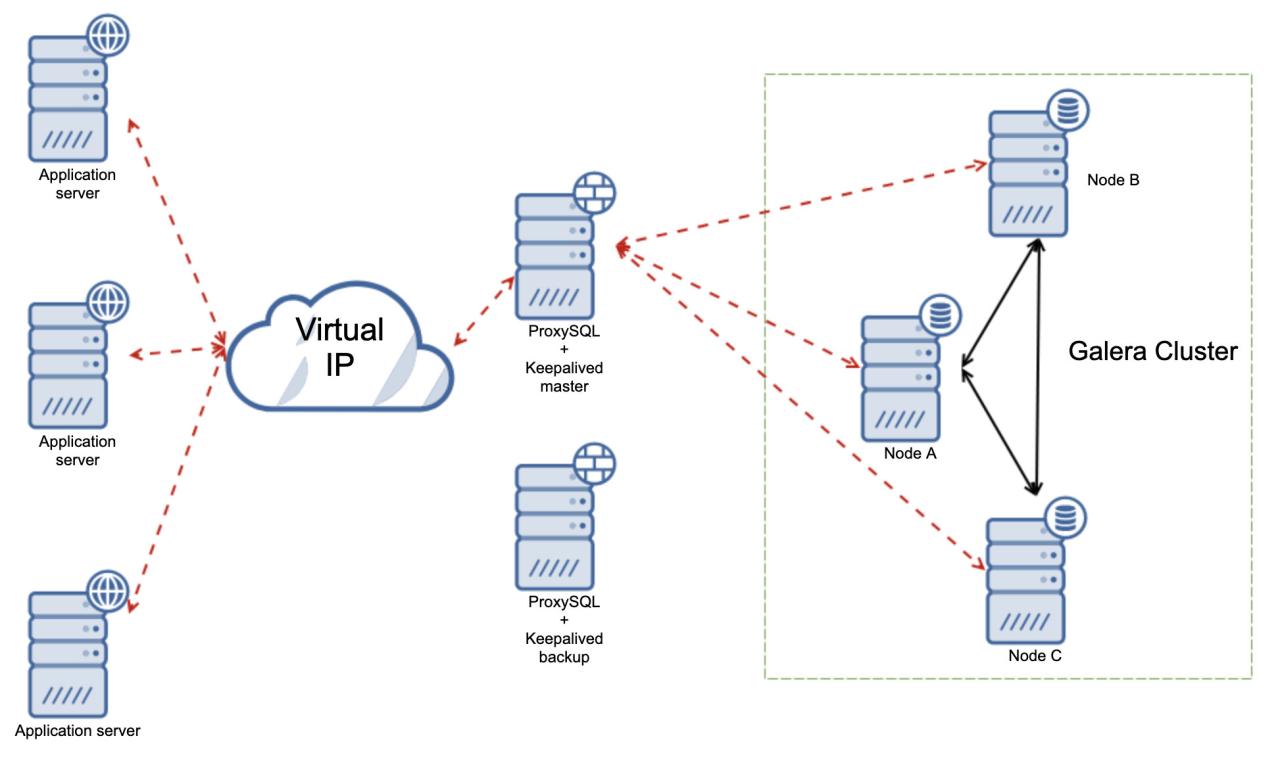
HAProxy is a high-performance, open-source load balancer, widely used for its speed, stability, and flexibility. It is an excellent choice for load balancing MySQL traffic, offering features such as health checks, connection pooling, and SSL termination. This section will guide you through installing and configuring HAProxy for MySQL load balancing.
Installing HAProxy
Installing HAProxy is generally straightforward, but the specific commands vary depending on your operating system. Here’s how you can install it on some common Linux distributions:
- Debian/Ubuntu: Use the `apt` package manager.
- Update the package list:
sudo apt update - Install HAProxy:
sudo apt install haproxy -y - CentOS/RHEL: Use the `yum` or `dnf` package manager.
- Install HAProxy:
sudo yum install haproxy -yorsudo dnf install haproxy -y - Verification: After installation, verify the installation with the command
haproxy -v. This should display the HAProxy version.
Configuring HAProxy
The HAProxy configuration file, typically located at `/etc/haproxy/haproxy.cfg`, defines how HAProxy handles incoming traffic. The configuration is divided into sections, each serving a specific purpose. The following steps Artikel the key configuration elements for MySQL load balancing.
- Backup the Original Configuration: Before making any changes, create a backup of the existing configuration file:
sudo cp /etc/haproxy/haproxy.cfg /etc/haproxy/haproxy.cfg.bak - Edit the Configuration File: Open the HAProxy configuration file using a text editor like `nano` or `vim`:
sudo nano /etc/haproxy/haproxy.cfg - Define Global Settings: The `global` section sets global parameters for HAProxy.
global: This section defines global settings.log /dev/log local0 info: Configures logging to the system log.daemon: Runs HAProxy in daemon mode.maxconn 2000: Sets the maximum number of concurrent connections. Adjust this based on your server’s capacity.- Configure Default Settings: The `defaults` section sets default values for all subsequent sections.
defaults: Defines default settings.log global: Inherits logging settings from the `global` section.mode tcp: Sets the mode to TCP, suitable for MySQL traffic.timeout connect 5s: Sets the connection timeout.timeout client 30s: Sets the client timeout.timeout server 30s: Sets the server timeout.- Define Frontend Configuration: The `frontend` section defines how HAProxy receives client requests.
frontend mysql-frontend: Defines a frontend named `mysql-frontend`.bind: Binds to all interfaces on port 3306 (the default MySQL port).
-:3306default_backend mysql-backend: Directs traffic to the `mysql-backend` backend.- Define Backend Configuration: The `backend` section defines how HAProxy distributes traffic to the MySQL servers.
backend mysql-backend: Defines a backend named `mysql-backend`.balance roundrobin: Uses the round-robin load balancing algorithm. Other options include `leastconn`, `source`, etc.server mysql1 192.168.1.10:3306 check: Defines a MySQL server at IP address 192.168.1.10 on port 3306. The `check` option enables health checks. Replace with your actual server IP and port.server mysql2 192.168.1.11:3306 check: Defines a MySQL server at IP address 192.168.1.11 on port 3306. Replace with your actual server IP and port.- Configuration File Snippet: Here is an example configuration file snippet:
- Restart HAProxy: After saving the configuration file, restart HAProxy to apply the changes:
sudo systemctl restart haproxyorsudo service haproxy restart.Check the status with
sudo systemctl status haproxyto confirm it’s running without errors. - Testing the Configuration: Test the setup by connecting to the HAProxy server on port 3306 using a MySQL client. Verify that connections are being distributed between the backend MySQL servers. You can monitor the HAProxy statistics using tools like `haproxyctl` or the HAProxy stats page (if configured).
global log /dev/log local0 info daemon maxconn 2000 defaults log global mode tcp timeout connect 5s timeout client 30s timeout server 30s frontend mysql-frontend bind -:3306 default_backend mysql-backend backend mysql-backend balance roundrobin server mysql1 192.168.1.10:3306 check server mysql2 192.168.1.11:3306 check
Configuring MySQL Router for Load Balancing
MySQL Router offers a lightweight and efficient solution for load balancing MySQL traffic, simplifying the process of connecting applications to a MySQL cluster. Its ease of configuration and deployment makes it an attractive option, especially for applications needing high availability and scalability. This section will guide you through the installation, configuration, and integration of MySQL Router with your MySQL cluster.
Installing and Configuring MySQL Router
The installation process for MySQL Router varies slightly depending on your operating system. However, the general steps remain consistent.
- Installation: Download the appropriate package for your operating system from the MySQL website or use your system’s package manager (e.g., `apt` on Debian/Ubuntu, `yum` or `dnf` on CentOS/RHEL). For example, on Debian/Ubuntu, you would typically use:
sudo apt updatesudo apt install mysql-router - Configuration: After installation, the core configuration involves defining the connection details for your MySQL cluster and specifying the desired routing behavior. This is typically done through a configuration file.
- Service Management: Once configured, start and enable the MySQL Router service to ensure it runs automatically on system startup. You can use systemd or your system’s service management tools. For example, on systems using systemd:
sudo systemctl start mysql-routersudo systemctl enable mysql-router
Configuration File Snippets for MySQL Router
The configuration file for MySQL Router, typically located at `/etc/mysqlrouter/mysqlrouter.conf`, defines how the router interacts with the MySQL cluster. Let’s examine the key sections and their purposes.
[DEFAULT]Section: This section contains global settings applicable to the entire router instance.Example:
[DEFAULT]
user=mysqlrouter
basedir=/usr/lib/mysqlrouter
datadir=/var/lib/mysqlrouter
In this example:
userspecifies the user account under which the router runs.basedirindicates the installation directory.datadirdefines the directory for data files.
[logger]Section: This section configures the logging behavior of MySQL Router.Example:
[logger]
level=INFO
file=/var/log/mysqlrouter.log
In this example:
levelsets the logging level (e.g., INFO, WARNING, ERROR).filespecifies the log file location.
[routing:Section: This is the most critical section, defining the routing configuration. You can have multiple routing sections, each with different configurations.] Example:
[routing:]
bind_address=0.0.0.0
bind_port=6446
destinations=:3306, :3306, :3306
mode=read-write
protocol=classic
In this example:
bind_addressspecifies the IP address to which the router binds (0.0.0.0 binds to all interfaces).bind_portsets the port on which the router listens for client connections.destinationslists the addresses and ports of the MySQL cluster members.modedefines the routing mode (e.g., read-write, read-only). In `read-write` mode, all connections are directed to the primary or a suitable server. In `read-only` mode, only read operations are allowed, and they are distributed across the available replicas.protocolspecifies the MySQL protocol (e.g., classic, x).
- Other sections: Other sections, such as `[metadata_cache]` and `[bootstrap]` are used for managing cluster metadata and bootstrapping the router.
Integrating MySQL Router with a MySQL Cluster
Integrating MySQL Router with a MySQL cluster involves configuring the router to connect to the cluster members and directing application traffic through the router.
- Cluster Discovery: MySQL Router can automatically discover cluster members using the cluster’s metadata. This simplifies the configuration, especially when the cluster membership changes. This discovery relies on the metadata service, which stores information about the cluster’s topology.
- Connection Strings: Your application’s connection strings must be updated to point to the MySQL Router’s address and port, instead of directly to the MySQL servers. For example, if the router is running on the same server as the application and listening on port 6446, the connection string would be `mysql://
: @127.0.0.1:6446/ `. - Testing and Monitoring: After configuration, test the connection from your application and monitor the router’s logs and performance to ensure proper load balancing and failover. Tools like `mysqlrouter –status` can be used to check the router’s status.
Implementing ProxySQL for MySQL Load Balancing
ProxySQL is a high-performance, open-source, SQL-aware proxy for MySQL, MariaDB, and Percona Server. It offers advanced features like query caching, connection pooling, and traffic shaping, making it a robust solution for load balancing and improving database performance. This section details the installation, configuration, and architectural considerations for deploying ProxySQL in a MySQL load balancing setup.
Installing and Configuring ProxySQL
Installing and configuring ProxySQL involves several steps, from obtaining the software to setting up its initial configuration. The installation process can vary slightly depending on the operating system.
- Installation: The installation process typically involves downloading the appropriate package for your operating system (e.g., Debian, Ubuntu, CentOS, RHEL) from the ProxySQL website or your distribution’s package manager. For example, on Debian/Ubuntu systems, you might use `apt-get install proxysql`. On CentOS/RHEL, you might use `yum install proxysql`.
- Initial Configuration: After installation, ProxySQL usually starts with a default configuration. You’ll need to connect to the ProxySQL admin interface (typically using the MySQL client with the default credentials: username `admin`, password `admin`, and port 6032 for the admin interface and 6033 for the backend MySQL servers) to configure it.
- Admin Interface Access: Accessing the admin interface is crucial for configuring and managing ProxySQL. You connect to it using a MySQL client, specifying the admin port and credentials.
- Configuration Files: ProxySQL’s configuration is primarily managed through its internal database. While there might be some initial configuration files, the majority of settings are stored within the `proxysql` database itself.
Key Configuration Parameters for MySQL Servers
Several key parameters are essential for configuring ProxySQL to work effectively with your MySQL servers. These parameters define how ProxySQL connects to and manages the backend MySQL servers.
- MySQL Servers: You need to define your MySQL servers in the `mysql_servers` table within the `proxysql` database. Each server entry includes:
- `hostgroup_id`: An integer identifying the hostgroup the server belongs to. Hostgroups are used to logically group servers.
- `hostname`: The hostname or IP address of the MySQL server.
- `port`: The port number the MySQL server is listening on (usually 3306).
- `username`: The username ProxySQL will use to connect to the MySQL server.
- `password`: The password for the ProxySQL user.
- `weight`: A numerical value that determines the server’s weight in the load balancing algorithm (higher weight means more traffic).
- `max_connections`: The maximum number of connections allowed to the server.
- Hostgroups: Hostgroups are logical groupings of MySQL servers. This is configured in the `mysql_servers` table via the `hostgroup_id` column. You can define different hostgroups for different purposes (e.g., master, slaves).
- MySQL Users: Define MySQL users in the `mysql_users` table. These users define how ProxySQL authenticates incoming client connections. They map incoming usernames and passwords to backend MySQL server credentials.
- Query Rules: Query rules allow you to control how queries are routed and cached. You can define rules to:
- Route specific queries to specific hostgroups.
- Cache query results.
- Rewrite queries.
- Block queries.
- Admin Interface Settings: You can configure the admin interface’s listening address and port through the `admin_variables` table. This is essential for security and access control.
ProxySQL-Based Load Balancing Architecture Diagram
The following diagram illustrates a typical ProxySQL-based load balancing architecture.
Diagram Description: The diagram depicts a load balancing setup using ProxySQL. Client applications connect to ProxySQL, which then distributes the traffic across multiple MySQL servers. The diagram is structured as follows:
Top Level: Represents the Client Applications. These are the systems that send SQL queries to the database.
Middle Level: Shows ProxySQL, acting as the central load balancer. It sits between the client applications and the MySQL servers. Arrows indicate that client requests are routed to ProxySQL, which then directs them to the appropriate MySQL server.
Bottom Level: Depicts two MySQL servers (MySQL Server 1 and MySQL Server 2). These servers host the actual database data. Each server is connected to ProxySQL via a line, indicating the connection established by ProxySQL to these backend servers. A dashed line indicates that a replication setup (e.g., master-slave) might exist between the MySQL servers, although this is not managed by ProxySQL directly but by the MySQL servers themselves.
Key Components and Connections:
- Client Applications: Connect to ProxySQL (e.g., on port 6033).
- ProxySQL: Receives client connections, analyzes queries, and forwards them to the appropriate MySQL server based on the configured load balancing algorithm, query rules, and server health.
- MySQL Servers: Handle the actual database operations.
- Arrows: Show the flow of SQL queries from the client applications, through ProxySQL, and to the MySQL servers.
Benefits of this architecture:
- High Availability: If one MySQL server fails, ProxySQL automatically redirects traffic to the remaining servers.
- Improved Performance: ProxySQL can cache query results, reduce the load on the MySQL servers, and optimize query routing.
- Scalability: You can easily add more MySQL servers to the backend to handle increased traffic.
Testing and Monitoring Your Load Balancing Setup

After successfully implementing load balancing for your MySQL servers, thorough testing and continuous monitoring are crucial to ensure optimal performance, high availability, and efficient resource utilization. This section Artikels the essential tests to perform and the key metrics to monitor to maintain a healthy and reliable load-balanced MySQL environment. It also covers common troubleshooting steps to address any issues that may arise.
Verifying Load Balancing Functionality
Before putting your load-balanced MySQL setup into production, it’s vital to verify that it’s functioning as expected. This involves simulating client connections and observing how the load balancer distributes traffic across the backend MySQL servers.
- Connection Distribution Testing: Verify that the load balancer distributes client connections evenly across all available MySQL servers. This can be achieved by:
- Connecting multiple clients simultaneously to the load balancer and observing the connection counts on each backend server. Ideally, the connection counts should be roughly equal across all servers.
- Using tools like `mysqlslap` to simulate a large number of concurrent connections and measure the distribution. For example:
mysqlslap --user=your_user --password=your_password --concurrency=100 --iterations=1 --create-database=your_database --query="SELECT 1" --host=your_load_balancer_ipThis command simulates 100 concurrent connections, executes a simple `SELECT 1` query, and measures performance. The output will show the total time taken and the number of connections handled. Analyze the connection counts on each backend server after running this test.
- Failover Testing: Simulate the failure of one or more MySQL servers to ensure the load balancer automatically redirects traffic to the remaining healthy servers. This can be tested by:
- Temporarily shutting down a backend MySQL server and observing that client connections are automatically routed to the other available servers.
- Monitoring the load balancer’s logs or monitoring dashboards to confirm that the failed server is detected and marked as unavailable.
- Verifying that the clients can still connect and access the database without interruption.
- Performance Testing: Evaluate the overall performance of the load-balanced setup under different workloads. This can be done by:
- Using benchmarking tools like `sysbench` to simulate various database workloads (e.g., read-only, read-write) and measure performance metrics such as queries per second (QPS), transaction per second (TPS), and response times. For example:
sysbench --test=oltp_read_write --mysql-host=your_load_balancer_ip --mysql-user=your_user --mysql-password=your_password --mysql-db=your_database --threads=10 --time=60 --report-interval=5 runThis command runs a read-write workload with 10 threads for 60 seconds. Analyze the output for QPS, TPS, and latency.
- Comparing the performance of the load-balanced setup with the performance of a single MySQL server to identify any performance bottlenecks.
- Using benchmarking tools like `sysbench` to simulate various database workloads (e.g., read-only, read-write) and measure performance metrics such as queries per second (QPS), transaction per second (TPS), and response times. For example:
Monitoring Key Metrics for MySQL Load Balancing
Continuous monitoring is essential for proactively identifying and addressing performance issues, ensuring high availability, and optimizing resource utilization. Several key metrics should be monitored regularly.
- Connection Counts: Monitor the number of active connections to each backend MySQL server.
- High connection counts on a single server, consistently higher than other servers, could indicate an uneven distribution of traffic or a server-specific performance issue.
- Sudden spikes in connection counts may signal an unexpected surge in traffic, requiring investigation.
- Use the `SHOW STATUS LIKE ‘Threads%’;` command in the MySQL client to view connection-related metrics.
- Query Performance: Track query execution times and the number of queries executed per second (QPS).
- Slow query performance can indicate overloaded servers, inefficient queries, or network latency.
- Monitor the `Slow_queries` status variable to identify slow-running queries. Analyze the slow query log to optimize problematic queries.
- Use tools like `pt-query-digest` (from Percona Toolkit) to analyze slow query logs and identify the most resource-intensive queries.
- Server Health: Monitor the health of the MySQL servers, including CPU utilization, memory usage, disk I/O, and network traffic.
- High CPU utilization can indicate that servers are overloaded and unable to handle the workload efficiently.
- Insufficient memory can lead to performance degradation due to excessive swapping.
- High disk I/O can be a bottleneck, especially for write-intensive workloads.
- Monitor these metrics using system monitoring tools such as `top`, `htop`, `iostat`, `netstat`, and dedicated monitoring solutions (e.g., Prometheus with Grafana).
- Load Balancer Status: Monitor the status of the load balancer itself, including its health checks and connection statistics.
- Ensure that the load balancer is correctly detecting the health of the backend servers and routing traffic accordingly.
- Monitor the load balancer’s CPU usage, memory usage, and network traffic to ensure it is not becoming a bottleneck.
- Use the load balancer’s monitoring interface (e.g., HAProxy’s statistics page) to view real-time connection statistics, server health, and error rates.
Troubleshooting Common Load Balancing Issues
When issues arise, a systematic approach is required to diagnose and resolve them. This section Artikels common issues and provides troubleshooting steps.
- Uneven Traffic Distribution: If traffic is not evenly distributed, consider these steps:
- Verify Configuration: Double-check the load balancer configuration to ensure that the backend servers are correctly defined and that the load balancing algorithm is appropriate for your needs (e.g., round-robin, least connections).
- Server Health Checks: Ensure that the load balancer’s health checks are correctly configured and accurately detecting the health of the backend servers. Incorrect health checks may cause the load balancer to incorrectly mark a healthy server as unavailable or fail to detect a failing server.
- Server Capacity: Ensure that the backend servers have sufficient resources (CPU, memory, disk I/O) to handle the expected workload. If one server is consistently overloaded, it may be necessary to scale up the server’s resources or add more backend servers.
- Connection Issues: If clients are unable to connect to the database, investigate the following:
- Load Balancer Availability: Verify that the load balancer itself is running and accessible.
- Network Connectivity: Check network connectivity between the clients, the load balancer, and the backend MySQL servers. Ensure that firewalls and security groups are not blocking traffic.
- MySQL Server Availability: Verify that the backend MySQL servers are running and accessible. Check the MySQL server logs for any errors or issues.
- Load Balancer Configuration: Ensure that the load balancer is correctly configured to forward traffic to the MySQL servers. Verify that the port numbers are correct and that the load balancer is listening on the correct interfaces.
- Performance Degradation: If the database performance degrades, investigate these areas:
- Slow Queries: Identify and optimize slow-running queries by analyzing the slow query log and using tools like `pt-query-digest`.
- Resource Constraints: Check for resource constraints on the MySQL servers (CPU, memory, disk I/O) and the load balancer. Scale up resources as needed.
- Network Latency: Check for network latency between the clients, the load balancer, and the MySQL servers. Optimize network configuration and reduce network hops if possible.
- Load Balancer Overload: Ensure that the load balancer itself is not becoming a bottleneck. Monitor the load balancer’s resource usage and scale it up if necessary.
- Failover Issues: If failover is not working as expected:
- Health Checks: Verify that the load balancer’s health checks are configured to quickly detect server failures.
- Replication: Ensure that MySQL replication is correctly configured and that the secondary servers are up-to-date with the primary server.
- Load Balancer Configuration: Double-check the load balancer configuration to ensure that it is correctly configured to automatically redirect traffic to the remaining healthy servers upon failure.
Advanced Load Balancing Techniques
Implementing advanced load balancing techniques can significantly enhance the performance, scalability, and resilience of your MySQL database infrastructure. These techniques go beyond basic load distribution, offering sophisticated features to optimize query execution, manage connections efficiently, and enable read/write splitting for improved resource utilization. This section explores query caching, connection pooling, and read/write splitting, providing practical examples and configuration strategies using popular load balancers.
Query Caching
Query caching is a powerful optimization technique that stores the results of frequently executed queries in memory. This allows subsequent requests for the same data to be served directly from the cache, bypassing the need to query the database server. This can dramatically reduce the load on your MySQL servers and improve response times, especially for read-heavy workloads.To implement query caching, you’ll need to configure your load balancer to recognize and utilize a caching mechanism.
The specific implementation depends on the chosen load balancer software.* HAProxy: HAProxy itself doesn’t provide built-in query caching. However, you can integrate it with external caching solutions like Memcached or Redis. The process involves directing queries to the caching server first and only forwarding to the MySQL servers if the cache misses.
Example
Configuring HAProxy to utilize Redis for query caching would involve setting up Redis and configuring HAProxy’s ACLs (Access Control Lists) and actions to check the Redis cache before forwarding the query to the backend MySQL servers. If the query exists in Redis, the response is served from the cache; otherwise, the query is forwarded to the MySQL server, and the result is cached in Redis.
MySQL Router
MySQL Router, while primarily a routing solution, does not natively offer query caching. The caching would typically be handled by an external caching layer, similar to the HAProxy approach. The router would then be configured to direct traffic to this caching layer before reaching the MySQL servers.
ProxySQL
ProxySQL provides built-in query caching capabilities. It can cache query results based on various criteria, such as the query text, user, and database. This built-in functionality simplifies the setup and management of query caching.
Example
Configuring ProxySQL to cache SELECT queries with a specific TTL (Time To Live) involves defining cache rules within the ProxySQL configuration. This configuration specifies which queries to cache and for how long. “`sql — Example ProxySQL configuration for query caching INSERT INTO mysql_query_cache_rules (rule_id, match_pattern, cache_ttl) VALUES (1, ‘SELECT
FROM mytable’, 3600); — Cache for 1 hour
LOAD MYSQL QUERY CACHE RULES TO RUNTIME; “` This example caches all `SELECT
FROM mytable` queries for one hour.
Connection Pooling
Connection pooling is a technique that maintains a pool of persistent database connections. When a client requests a connection, the load balancer retrieves one from the pool instead of establishing a new connection. This significantly reduces the overhead associated with establishing and tearing down connections, improving performance and resource utilization.Connection pooling is crucial, particularly in environments with high connection churn.
The benefits include reduced latency, better resource management on the database servers, and increased overall system throughput.* HAProxy: HAProxy itself does not offer built-in connection pooling. However, it can be configured to manage connections to backend servers. The persistent connections can be managed through `option mysql-check` and `option tcp-keep-alive`.
Example
HAProxy can be configured to use persistent connections to the MySQL servers by setting the `option mysql-check` directive in the backend configuration. This tells HAProxy to monitor the health of the MySQL servers and keep connections alive. The `option tcp-keep-alive` directive can also be set to enable TCP keep-alive, which helps to maintain the connections.
MySQL Router
MySQL Router provides connection pooling capabilities by default. It manages connections to the backend MySQL servers and reuses them efficiently. This default behavior minimizes the overhead of establishing new connections.
Example
MySQL Router’s default configuration manages a pool of connections to the backend MySQL servers. The router handles connection establishment, reuse, and health checks automatically. You typically do not need to configure connection pooling explicitly in MySQL Router.
ProxySQL
ProxySQL excels in connection pooling. It maintains a pool of connections to the backend MySQL servers and efficiently manages connection reuse. This reduces the load on the database servers and improves performance. ProxySQL allows for extensive customization of the connection pool, including setting the maximum number of connections, connection timeouts, and idle connection timeouts.
Example
Configuring ProxySQL to manage a connection pool involves adjusting settings like `mysql-max_connections` and `mysql-idle_connections_timeout`. “`sql — Example ProxySQL configuration for connection pooling SET mysql-max_connections = 2000; — Max connections to backend servers SET mysql-idle_connections_timeout = 3600; — Idle connection timeout in seconds LOAD MYSQL VARIABLES TO RUNTIME; “` This configuration sets the maximum number of connections to 2000 and the idle connection timeout to 3600 seconds.
Read/Write Splitting
Read/write splitting is a technique that separates read and write operations to different MySQL servers. Write operations are directed to the primary (master) server, while read operations are distributed among replica (slave) servers. This improves performance by distributing the read load and allows for scaling read capacity independently of write capacity.Implementing read/write splitting requires a load balancer that can intelligently route queries based on their type (read or write).* HAProxy: HAProxy can be configured for read/write splitting using a combination of ACLs and server weighting.
You can define ACLs to identify read and write queries and then direct them to the appropriate backend servers.
Example
Configuring HAProxy for read/write splitting involves defining ACLs to detect read and write queries. For instance, an ACL can be created to match `SELECT` statements. Read queries are then directed to a pool of replica servers, while write queries are directed to the primary server. Server weights can be adjusted to control the distribution of read traffic across the replicas.
“`haproxy frontend mysql_frontend bind
3306 mode tcp default_backend mysql_read_write backend mysql_read_write mode tcp balance roundrobin server mysql_master 192.168.1.10:3306 check server mysql_slave1 192.168.1.11:3306 check server mysql_slave2 192.168.1.12:3306 check acl is_read method GET use_backend mysql_read_slaves if is_read backend mysql_read_slaves mode tcp balance roundrobin server mysql_slave1 192.168.1.11:3306 check server mysql_slave2 192.168.1.12:3306 check “` This example directs all traffic to `mysql_read_write` backend.
It then checks if it is a `GET` method, if it is, then it is redirected to `mysql_read_slaves`.
MySQL Router
MySQL Router is specifically designed for read/write splitting. It automatically detects the type of query and routes it to the appropriate server based on the configuration. MySQL Router simplifies the implementation of read/write splitting.
Example
MySQL Router’s default configuration typically supports read/write splitting. You specify the primary and replica servers, and the router automatically routes read queries to the replicas and write queries to the primary. You can customize the routing behavior based on your specific requirements, such as using different routing strategies or configuring failover mechanisms.
ProxySQL
ProxySQL offers robust read/write splitting capabilities. It can analyze queries and route them to the appropriate backend servers based on the query type. ProxySQL allows for sophisticated read/write splitting configurations, including query rewriting and advanced routing rules.
Example
Configuring ProxySQL for read/write splitting involves defining routing rules. These rules can be based on query patterns, users, or databases. For instance, you can define a rule to route all `SELECT` queries to a group of read replicas and all other queries to the primary server. ProxySQL also supports query rewriting, allowing you to modify queries before they are sent to the backend servers.
“`sql — Example ProxySQL configuration for read/write splitting — Define read/write hostgroups INSERT INTO mysql_servers (hostgroup_id, hostname, port, username, password) VALUES (10, ‘192.168.1.10’, 3306, ‘mysql_user’, ‘password’); — Master INSERT INTO mysql_servers (hostgroup_id, hostname, port, username, password) VALUES (20, ‘192.168.1.11’, 3306, ‘mysql_user’, ‘password’); — Slave 1 INSERT INTO mysql_servers (hostgroup_id, hostname, port, username, password) VALUES (20, ‘192.168.1.12’, 3306, ‘mysql_user’, ‘password’); — Slave 2 LOAD MYSQL SERVERS TO RUNTIME; — Route read queries to read replicas (hostgroup 20) INSERT INTO mysql_query_rules (rule_id, active, match_pattern, destination_hostgroup) VALUES (1, 1, ‘^SELECT’, 20); — Route other queries (writes) to master (hostgroup 10)
all other queries
INSERT INTO mysql_query_rules (rule_id, active, match_pattern, destination_hostgroup) VALUES (2, 1, ‘.*’, 10); — All other queries LOAD MYSQL QUERY RULES TO RUNTIME; “` This configuration creates two hostgroups, one for the master and one for the slaves.
It then defines query rules to route `SELECT` statements to the slave hostgroup (20) and all other queries to the master hostgroup (10).
Security Considerations for Load Balancing
Securing your load-balanced MySQL environment is paramount to protecting your data and ensuring the availability of your services. Implementing robust security measures at every layer, from the load balancer itself to the MySQL servers, is crucial. This section details best practices for safeguarding your load balancing setup, covering the load balancer’s security, SSL/TLS encryption, and other essential security considerations.
Securing the Load Balancer
The load balancer acts as the primary entry point to your MySQL servers, making it a critical target for attackers. Protecting the load balancer involves several key strategies.
- Regular Security Updates: Keeping the load balancer software up-to-date with the latest security patches is crucial. Vulnerabilities are constantly discovered, and timely patching mitigates the risk of exploitation. Monitor vendor announcements and apply updates promptly. For example, if using HAProxy, regularly check the HAProxy website for security advisories and apply the latest stable version.
- Restricting Access: Limit access to the load balancer’s management interface. Use strong passwords, implement multi-factor authentication (MFA), and restrict access to authorized personnel only. Consider using a firewall to control incoming connections to the management port. For instance, only allow access from specific IP addresses or a secure VPN connection.
- Network Segmentation: Place the load balancer in a separate network segment, isolated from other less secure parts of your infrastructure. This limits the impact of a potential compromise. Use firewalls to control traffic flow between network segments.
- Disable Unnecessary Services: Disable any unnecessary services running on the load balancer. Each running service presents a potential attack vector. Only enable the services required for load balancing and monitoring.
- Intrusion Detection and Prevention Systems (IDS/IPS): Implement an IDS/IPS to monitor network traffic for malicious activity and block suspicious connections. This provides an additional layer of defense against attacks.
- Security Auditing and Logging: Regularly audit the load balancer’s configuration and access logs. Monitor logs for suspicious activity, such as unauthorized login attempts or unusual traffic patterns. This helps identify and respond to security incidents promptly.
Implementing SSL/TLS Encryption
Encrypting the connections between the load balancer and your MySQL servers is essential to protect data in transit. This prevents eavesdropping and man-in-the-middle attacks.
- Generating SSL/TLS Certificates: Obtain or generate SSL/TLS certificates for your MySQL servers. You can use a Certificate Authority (CA) to sign the certificates or generate self-signed certificates for internal use. If using self-signed certificates, ensure that the load balancer trusts the CA.
- Configuring SSL/TLS on MySQL Servers: Configure your MySQL servers to accept SSL/TLS connections. This typically involves specifying the certificate and key files in the MySQL configuration file (e.g., `my.cnf` or `my.ini`). Ensure that the `ssl_ca`, `ssl_cert`, and `ssl_key` options are correctly configured.
- Configuring SSL/TLS on the Load Balancer: Configure the load balancer to use SSL/TLS to connect to the MySQL servers. This involves specifying the certificate and key files for the load balancer to use when connecting to the MySQL servers. The specific configuration steps depend on the load balancer software used (e.g., HAProxy, MySQL Router, or ProxySQL).
- Enforcing Encryption: Enforce the use of SSL/TLS connections. Configure the MySQL servers to require SSL/TLS for all client connections. This ensures that all data is encrypted in transit.
- Example: HAProxy SSL/TLS Configuration: In HAProxy, you can configure SSL/TLS with the following:
“`
frontend mysql-frontend
bind

-:3306 ssl crt /path/to/your/certificate.pem
default_backend mysql-backendbackend mysql-backend
server mysql1 mysql1.example.com:3306 check ssl verify required ca-file /path/to/ca.pem
server mysql2 mysql2.example.com:3306 check ssl verify required ca-file /path/to/ca.pem
“`In this example, HAProxy is configured to accept SSL connections on port 3306 and forward them to the MySQL servers. The `ssl` option in the `bind` directive enables SSL/TLS, and the `crt` option specifies the certificate file. The `check ssl verify required ca-file` options in the `server` directives verify the SSL/TLS certificates of the MySQL servers, ensuring a secure connection.
Final Summary
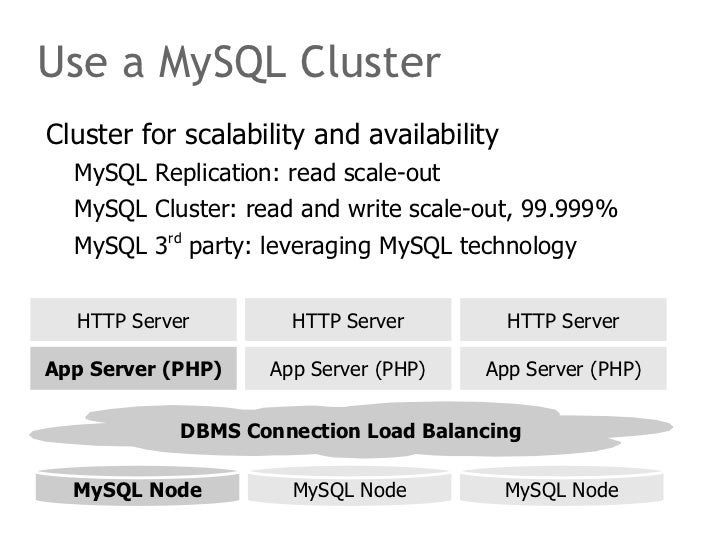
In conclusion, mastering the art of load balancing for MySQL servers is an investment in the future of your database infrastructure. By understanding the different methods, choosing the right tools, and implementing best practices, you can build a robust and scalable system capable of withstanding the demands of modern applications. Remember to prioritize testing, monitoring, and security to ensure a consistently high-performing and secure environment.
With the knowledge gained from this guide, you are now well-equipped to optimize your MySQL deployments and achieve peak performance.