Understanding how to learn React JS state management with Redux is essential for building scalable and maintainable applications. As modern web applications grow in complexity, managing state efficiently becomes increasingly important to ensure smooth user experiences and clean code architecture. Redux offers a predictable state container that complements React’s component-based approach, enabling developers to handle intricate data flows with confidence.
This guide explores the fundamental concepts of Redux, compares React’s native state handling methods, and provides practical step-by-step instructions for integrating Redux into React projects. Whether you’re new to state management or seeking to deepen your knowledge, this overview aims to equip you with the skills needed to leverage Redux effectively in your development workflow.
Introduction to React JS State Management with Redux

Managing state effectively is fundamental for creating responsive and maintainable React applications. As applications grow in complexity, handling data flow between components becomes increasingly challenging, necessitating robust solutions for state management. Redux has emerged as a popular library that simplifies this process by providing a centralized store for application state, facilitating predictable data updates and easier debugging.
Redux operates on core principles that ensure a unidirectional data flow and immutable state, which help developers maintain clarity and consistency throughout the development process. Its integration with React is seamless, offering tools and patterns that enhance the scalability of applications, especially when dealing with complex, interdependent states such as user authentication, shopping carts, or real-time updates. Leveraging Redux can significantly improve code organization, enabling teams to collaborate more effectively and reduce bugs related to state inconsistencies.
The Core Concepts of Redux and Its Role in React Development
Understanding the fundamental components of Redux is essential for harnessing its full potential within React applications. Redux is built around three core principles: a single source of truth, state is read-only, and changes are made with pure functions known as reducers. These principles enable predictable state management, making debugging and testing more straightforward.
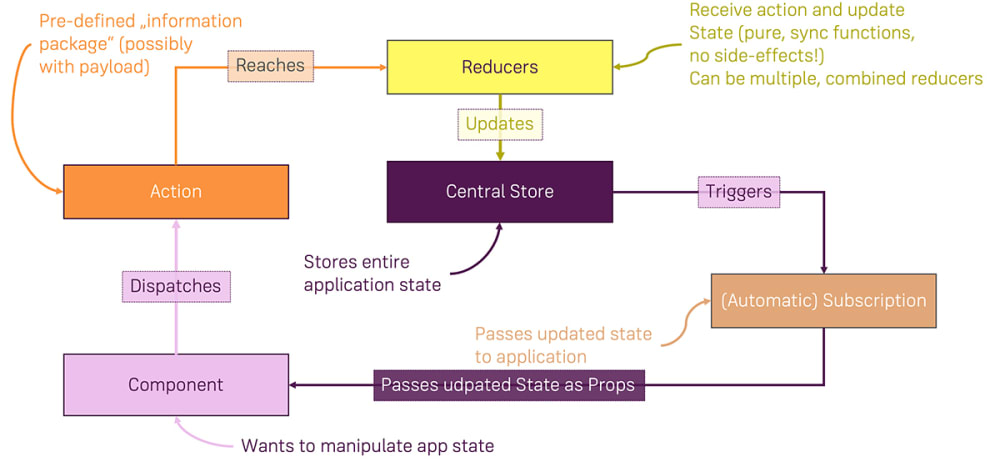
In a typical React-Redux setup, the store holds the entire application state, which is accessed by React components via specialized hooks or connect functions. When the application needs to modify the state—such as updating user data or toggling UI elements—it dispatches actions. Actions are plain objects describing the change, which are processed by reducers that produce new state objects without mutating the existing state.
This unidirectional data flow ensures that every change is traceable, facilitating better application structure and easier maintenance.
Advantages of Using Redux for Managing Complex State
Redux offers several benefits that make it particularly suited for managing intricate and interconnected application states. These advantages include enhanced predictability, improved debugging, and better scalability, particularly in large-scale applications.
By centralizing state management, Redux eliminates the challenge of prop drilling—passing data through many levels of components—and reduces the likelihood of inconsistent UI states. Its strict architecture encourages writing pure functions for state transformations, which simplifies testing processes and enhances reliability. Additionally, Redux’s middleware capabilities enable developers to handle side effects, such as API calls or asynchronous actions, in a structured manner.
Consider a complex e-commerce platform where multiple components need to access and update shared data like user info, product catalogs, and order statuses. Without a centralized approach, managing these states can become cumbersome, leading to bugs and performance issues. Redux streamlines this process, providing a scalable solution that ensures each component reflects the most current data, maintaining consistency across the application.
Foundations of React State
Understanding how React manages component state internally is fundamental for building dynamic and responsive user interfaces. React’s approach to state management is designed to facilitate component reactivity, ensuring that UI updates are synchronized with underlying data changes. As applications grow in complexity, grasping the core principles of internal state handling becomes crucial for optimizing performance and maintaining code clarity.
React provides several mechanisms to handle state at different levels, starting from local component state with useState, to global state sharing via Context API, and more advanced solutions like Redux for larger applications. Each of these methods offers unique capabilities and limitations, which influence their suitability depending on the application size and complexity.
React’s Internal State Management
React manages component state primarily through the useState hook and class component state. When a component’s state changes, React triggers a re-render of that component, ensuring the UI reflects the latest data. This internal state is kept local to the component, making it easy to manage for small to medium-sized components.
However, as applications scale, relying solely on local state can lead to challenges such as state duplication, prop drilling, and difficulty in maintaining a consistent data flow. To address these issues, React introduced Context API and other state management libraries like Redux, which offer more structured and scalable solutions for handling shared state across multiple components.
Comparison of React State Management Methods
This comparison table highlights the key features, use cases, and limitations of React’s primary state management approaches: useState, Context API, and Redux.
| Feature | useState | Context API | Redux |
|---|---|---|---|
| Scope | Local component state | Global state sharing among components | Application-wide state management |
| Ease of Use | Simple and straightforward for small state | Moderate; suitable for moderate sharing | More complex; requires setup and boilerplate |
| Performance | Highly efficient for isolated state | Effective, but can cause unnecessary re-renders if not optimized | Highly scalable; with careful implementation, minimal performance overhead |
| Suitability | Small to medium components with isolated states | Medium-sized apps with shared state needs | Large, complex applications requiring predictable state management |
| Limitations | Not suitable for sharing state across many components | Can lead to re-render issues and prop drilling if not managed carefully | Steeper learning curve; increased boilerplate code |
Limitations of React’s Local State in Large Applications
While React’s useState is efficient for managing state within individual components, its limitations become evident as applications grow. Relying solely on local state can result in complex component hierarchies, making state synchronization across disparate parts difficult. For example, in a large e-commerce platform where product details, user cart, and checkout status need to be consistent across multiple components, managing each piece of state locally would require extensive prop drilling or redundant code.
Such scenarios can lead to increased code complexity, difficulty in debugging, and decreased maintainability. Moreover, updating state in one part of the application might necessitate multiple re-renders, adversely affecting performance. To mitigate these issues, applications often migrate towards more centralized state management solutions like Redux, which provide a single source of truth and predictable data flow.
In large-scale React applications, local state management with
useStateis often supplemented or replaced by centralized solutions to ensure consistent, maintainable, and scalable state handling.
Core Principles of Redux

Understanding the fundamental principles that underpin Redux is crucial for designing predictable and maintainable state management in React applications. These core principles establish a clear structure for managing data flow and ensure consistent behavior across complex interfaces. Mastery of these concepts provides the foundation for leveraging Redux effectively.
Redux’s core principles revolve around three key concepts: a single source of truth, state immutability, and the use of pure functions for state updates. These principles facilitate a unidirectional data flow, making the application’s state easier to debug, test, and reason about. They also promote consistency and reliability, especially in large-scale or collaborative development environments.
Single Source of Truth
The principle of a single source of truth states that the entire application’s state should be stored in a single, centralized store. This approach eliminates issues related to state synchronization across multiple components and simplifies state tracking. When all data resides in one place, developers can easily inspect, debug, and manage the application’s current state, leading to more predictable behavior.
State is Read-Only
In Redux, the state is considered immutable once created. This means that components cannot directly modify the application’s state. Instead, any attempt to change the state must be done through dispatched actions, which serve as explicit signals indicating the need for a change. This read-only model prevents accidental mutations and makes state transitions transparent and traceable.
Changes Are Made with Pure Functions
State updates in Redux are handled exclusively by pure functions known as reducers. These functions take the previous state and an action as input and return a new, updated state without modifying the original data. Pure functions are deterministic, meaning they produce the same output for the same input and have no side effects. This ensures predictable state transitions and simplifies testing and debugging.
Redux Flow Infographic
Visualizing Redux’s architecture helps in understanding how data flows through an application. An effective infographic depicts the sequence of actions, reducers, store, and React components, illustrating the unidirectional flow. Actions are dispatched from components, which trigger reducers to process these actions and produce a new state. The store then holds this updated state, which components subscribe to for rendering. This cycle repeats with every interaction, maintaining a consistent data flow.
Immutability in Redux State Updates
Immutability is a fundamental aspect of Redux, ensuring that state changes do not overwrite existing data but instead create new versions of the state. This approach allows Redux to efficiently track changes, facilitate time-travel debugging, and prevent unintended side effects. During each update, reducers generate new state objects by copying the previous state and applying modifications, typically using methods like object spread operators or utilities such as Immutable.js.
This guarantees that the original state remains unchanged, preserving data integrity and enabling predictable state management.
Setting Up Redux in a React Project
Integrating Redux into a React application is a fundamental step towards managing complex state efficiently. Proper setup ensures that your application can handle state updates predictably and maintain scalability as it grows. This process involves installing essential packages, organizing your project structure, and configuring Redux files to work seamlessly with React components.
By following systematic procedures, developers can establish a robust foundation for state management, enabling clearer data flow and easier debugging. The setup process not only prepares the environment but also emphasizes best practices for organizing actions, reducers, and store configurations for maintainability and scalability.
Installing Redux and React-Redux Packages
To begin utilizing Redux within a React project, the first step involves installing the core Redux library along with the React bindings package, React-Redux. These packages facilitate the connection between Redux’s state management capabilities and React components, ensuring smooth data flow and state synchronization across your application.
- Open your terminal or command prompt in your project’s root directory.
- Run the following command to install the necessary packages:
npm install redux react-redux
or if you are using Yarn:
yarn add redux react-redux
- Verify the successful installation by checking the dependencies in your package.json file or running:
npm list redux react-redux
Once installed, these packages form the backbone of your state management setup, enabling you to create a centralized store and connect it effectively with your React components.
Organizing Redux Files: Actions, Reducers, Store Configuration
Structuring your Redux files systematically enhances code maintainability and clarity. Typically, your project should include separate folders or files dedicated to actions, reducers, and store configuration, following best practices for modular architecture.
The core components include:
- Actions: Define the types of changes that can occur within the application state. Actions are plain JavaScript objects containing a
typeproperty and optionally additional data (payload) needed for the state update. - Reducers: Functions that specify how the application’s state changes in response to actions. Reducers take the current state and an action as arguments and return a new state without mutating the original.
- Store Configuration: The centralized object that holds the application’s state. It is created using the
createStorefunction from Redux, which combines reducers and applies middleware if necessary.
Example structure of Redux files:
/src
  /redux
    /actions
      counterActions.js
    /reducers
      counterReducer.js
    store.js
In the store.js file, you set up the Redux store by combining reducers, applying middleware like thunk for asynchronous actions, and exporting the configured store for integration with your React application.
Consistent organization of these components ensures each aspect of state management remains manageable as your application scales, promoting clarity and ease of debugging.
Creating Actions and Reducers
Once the foundational concepts of React’s state management and Redux have been introduced, the next critical step involves defining the mechanisms that modify the application’s state—namely, actions and reducers. Actions serve as the payloads of information that describe what change needs to occur, while reducers specify how the application’s state should evolve in response to these actions. Mastering the creation of actions and reducers ensures a robust, predictable state management flow within your React-Redux applications.
Properly structured actions and reducers are essential for maintaining a clear separation of concerns and facilitating scalable code architecture. This section will provide concrete examples of defining action types and creators, demonstrate how to organize multiple reducers managing different slices of state, and clarify how dispatched actions trigger updates within reducers to produce the new application state.
Defining Action Types and Creators
Action types are constants that uniquely identify each kind of action dispatched in the application. Defining them as constants helps prevent typos and makes them easier to manage across different files. Action creators are functions that return action objects, encapsulating the creation process and ensuring consistency.
const ADD_TODO = 'ADD_TODO';const REMOVE_TODO = 'REMOVE_TODO';
Sample action creators for a todo application might look like this:
function addTodo(text)
  return
    type: ADD_TODO,
    payload:
      id: Date.now(),
      text,
    ,
  ;


function removeTodo(id)
  return
    type: REMOVE_TODO,
    payload:  id ,
  ;
These functions generate actions with specific types and payloads, which can then be dispatched to the Redux store to trigger state updates.
Organizing Multiple Reducers for Different State Slices
In complex applications, managing different parts of the state independently enhances clarity and maintainability. Redux facilitates this through the use of multiple reducers, each responsible for a specific slice of the state, such as user data, todos, or settings. The reducer functions listen for relevant actions and update their respective slices accordingly.
Reducer Name Initial State Manages todosReducer Todo list items and filtering criteria userReducer User authentication status and profile information settingsReducer Application settings and preferences Each reducer function listens for specific action types relevant to its domain. These functions take the current state and an action as parameters, and return a new state based on the action, without mutating the existing state, thereby adhering to Redux’s immutability principles.
Actions Triggering State Changes within Reducers
When an action is dispatched, Redux invokes all registered reducers, passing each the current state slice and the action object. Reducers then evaluate the action’s type to determine whether to update their slice of state. If relevant, the reducer returns a new state object; otherwise, it returns the current state unchanged.
function todosReducer(state = initialState, action)
  switch (action.type)
    case ADD_TODO:
      return
        ...state,
        list: [...state.list,  id: action.payload.id, text: action.payload.text ],
      ;
    case REMOVE_TODO:
      return
        ...state,
        list: state.list.filter(todo => todo.id !== action.payload.id),
      ;
    default:
      return state;
In this example, dispatching an ‘ADD_TODO’ action triggers the reducer to append a new todo item to the list, while a ‘REMOVE_TODO’ action filters out the specified item. This process ensures that each dispatched action leads to a predictable and controlled state transformation, facilitating easier debugging and consistent application behavior.
Integrating Redux Store with React Components
Once the Redux store has been configured and actions and reducers are in place, the next crucial step involves connecting React components to the Redux store. This integration enables components to access state data and dispatch actions effectively, establishing a seamless flow of data within the application. Proper integration ensures that components stay synchronized with the central store, facilitating predictable state management and enhancing maintainability.
React offers two primary approaches to connect components with Redux: the hooks API introduced in React-Redux v7.1.0 and the higher-order component (HOC) pattern. Both methods serve the same purpose but cater to different coding styles and project requirements. Understanding how to leverage these techniques is essential for building scalable and efficient React-Redux applications.
Connecting Components Using Hooks and Higher-Order Components
React-Redux provides the
useSelectoranduseDispatchhooks for functional components, offering a concise and straightforward way to interact with the Redux store. These hooks replace the traditionalconnect()function used in class components or older functional components. TheuseSelectorhook allows components to read state data, whileuseDispatchenables dispatching actions.Alternatively, the
connect()function from React-Redux creates higher-order components that connect a React component to the Redux store. This approach is particularly useful for class components or projects that prefer the HOC pattern. Both methods effectively tie the component lifecycle to the Redux state, but hooks generally lead to cleaner and more readable code.Comparison Table: connect() vs useSelector/useDispatch()
Feature connect() useSelector / useDispatch Syntax Style HOC-based, wraps the component with a function call Hook-based, used directly inside functional components Component Type Compatible with class components and functional components Primarily for functional components Code Readability May involve more boilerplate; less concise More concise and readable with hooks Flexibility Less flexible; relies on wrapping More flexible; hooks can be combined with other React hooks Performance May cause unnecessary re-renders if not optimized Can optimize selective re-renders with useSelectorDispatching Actions from Components
Dispatching actions within React components is fundamental to updating the Redux store. When using hooks, the
useDispatchhook provides access to the dispatch function, which can then be used to send actions. This method simplifies the process compared to the HOC pattern, where dispatch is typically passed as a prop.Below is an example demonstrating how to dispatch an action from a functional component using hooks:
import React from 'react';
import  useDispatch  from 'react-redux';
import  incrementCounter  from './actions';

function CounterButton()
  const dispatch = useDispatch();

  const handleIncrement = () =>
    dispatch(incrementCounter());
  ;

  return (
    <button onClick=handleIncrement>
      Increment Counter
    </button>
  );
In this example, clicking the button triggers the
handleIncrementfunction, which dispatches theincrementCounteraction to update the store. This pattern can be extended to more complex interactions, such as API calls or multi-action sequences, ensuring that components remain decoupled from the store’s internal implementation while maintaining predictable state updates.Managing State with Redux Toolkit
Redux Toolkit has emerged as the standard approach for managing state in React applications due to its simplicity, efficiency, and developer-friendly features. It streamlines the process of setting up Redux, reduces boilerplate code, and incorporates best practices out of the box. Transitioning from vanilla Redux to Redux Toolkit enables developers to write cleaner, more maintainable code while adhering to Redux principles.
Understanding how to effectively utilize Redux Toolkit for state management is essential for building scalable React applications. This section explores the advantages of Redux Toolkit over traditional Redux, details the steps involved in creating slices and configuring the store, and demonstrates practical implementation through example code.
Advantages of Redux Toolkit over Vanilla Redux
Redux Toolkit simplifies the process of managing state by providing a set of pre-configured tools and abstractions that handle common tasks efficiently. The key advantages include:
- Reduced Boilerplate: Redux Toolkit abstracts away the verbose setup involved in vanilla Redux, such as defining action types, action creators, and switch-case statements in reducers.
- Built-in Immutable Updates: It uses the Immer library internally, allowing developers to write “mutative” code that is automatically converted into immutable updates, enhancing code readability.
- Official Best Practices: Comes with recommended patterns and configurations, reducing the likelihood of common mistakes and promoting consistent code structure.
- Enhanced Performance: Optimizes reducer logic and updates, leading to better performance especially in large applications.
- Tooling Support: Integrates seamlessly with Redux DevTools, providing clear state change histories and debugging capabilities.
Organizing Procedures to Create Slices and Configure Store Using Redux Toolkit
Creating slices and configuring the Redux store with Redux Toolkit involves streamlined procedures that promote modularity and maintainability. The process typically follows these steps:
- Create a Slice: Use the
createSlicefunction to define a slice of the state, including its initial state, reducers, and actions. Slices encapsulate related state logic, making the code more organized.- Define Reducers and Actions: Within the slice, specify reducer functions that handle state updates. Redux Toolkit automatically generates corresponding action creators.
- Configure the Store: Use
configureStoreto set up the Redux store, combining multiple slices if necessary, and applying middleware or devtools configuration.- Integrate with React: Use
useDispatchanduseSelectorhooks to connect React components to the Redux store efficiently.By following these procedures, developers can establish a robust state management system with minimal boilerplate, improved code clarity, and adherence to Redux best practices.
Example Code Demonstrating Simplified State Management with createSlice
// Import necessary functions from Redux Toolkit import createSlice, configureStore from '@reduxjs/toolkit'; // Create a slice for managing counter state const counterSlice = createSlice( name: 'counter', initialState: value: 0 , reducers: increment: (state) => state.value += 1; // Immer allows direct mutation , decrement: (state) => state.value -= 1; , reset: (state) => state.value = 0; , , ); // Extract actions for dispatching const actions, reducer = counterSlice; const increment, decrement, reset = actions; // Configure store with the counter slice reducer const store = configureStore( reducer: counter: reducer, , ); // Usage in React component // import useDispatch, useSelector from 'react-redux'; // const CounterComponent = () => // const dispatch = useDispatch(); // const count = useSelector((state) => state.counter.value); // return ( ////// );// ;Count: count
// // // //Advanced State Management Techniques
As React applications grow in complexity, managing state efficiently becomes increasingly vital. Beyond basic Redux setup, developers leverage advanced techniques and middleware to handle asynchronous operations, organize complex logic, and optimize performance. Mastering these techniques ensures scalable, maintainable, and responsive applications that can handle real-world data flows seamlessly.
Implementing middleware such as Redux Thunk or Redux Saga enables developers to manage asynchronous actions effectively, ensuring that data fetching, side effects, and complex workflows are handled in a structured manner. Additionally, organizing state logic with selectors and middleware enhances code clarity, performance, and testability, especially in large-scale projects where state interactions become intricate.
Middleware for Asynchronous Actions
Middleware in Redux acts as an intermediary layer that intercepts dispatched actions before they reach reducers. It is essential for handling asynchronous logic, which is common in real-world applications such as fetching data from APIs or performing delayed actions.
- Redux Thunk: Allows writing action creators that return functions instead of plain action objects. These functions can dispatch multiple actions over time, manage async operations, and access the store’s state.
- Redux Saga: Utilizes generator functions to handle side effects declaratively. It offers more sophisticated control over async flows, such as cancellation, concurrency, and sequencing, making it suitable for complex workflows.
Both middleware effectively decouple async logic from components, promoting cleaner component code and more predictable data flows.
Flowcharts for Asynchronous Data Fetching and State Updates
Visualizing asynchronous data flows helps in understanding the sequence of dispatches, API requests, and state updates. Below are descriptions of typical flowcharts used:
- Data Fetching Workflow: Starts with dispatching a “fetch request” action, followed by middleware intercepting this action to initiate an API call. Upon success, a “fetch success” action updates the state with fetched data; on failure, a “fetch failure” action can trigger error handling.
- State Update Sequence: Once data is received, reducers process the success or failure actions to update the state accordingly. The UI components subscribe to state changes and re-render with new data or error messages.
Example of an async flow: Dispatch(“FETCH_DATA”) → Middleware intercepts and performs API call → On success, dispatch(“FETCH_SUCCESS”) with payload → Reducer updates state → UI reflects new data.
Organizing Complex State Logic with Middleware and Selectors
In large applications, state logic can become intricate, necessitating structured organization through middleware and selectors.
Middleware can intercept actions to handle side effects, perform validation, or trigger additional actions, helping to centralize and streamline complex workflows. It also facilitates managing concurrent async operations and error handling systematically. For example, Redux Saga can orchestrate multiple related API calls, retry mechanisms, or cancellation logic in a clear, declarative manner.
Selectors are functions that extract specific slices of state, often with memoization to optimize performance. They abstract away the complexity of state shape, making component code cleaner and reducing bugs. Organizing selectors into centralized files promotes reusability and easier maintenance, especially when dealing with deeply nested or normalized state structures.
Pro tip: Combine middleware with well-defined selectors to maintain a predictable data flow, improve debugging, and facilitate unit testing of state logic.
Best Practices and Common Patterns
Effective management of Redux code is crucial for building scalable, maintainable, and efficient React applications. Adopting best practices and recognizing common patterns helps developers organize their state logic, streamline debugging, and ensure code consistency across projects. This section explores recommended strategies for structuring Redux code, techniques for maintaining and debugging state, and the separation of container and presentational components to optimize application architecture.
Structuring Redux Code for Scalability
Proper organization of Redux code facilitates easier scaling as applications grow in complexity. As projects expand, managing actions, reducers, and selectors effectively becomes essential to prevent codebase clutter and improve maintainability. Below are best practices to structure Redux code for scalability:
- Divide state management into feature-specific slices: Use the “slice” pattern introduced by Redux Toolkit, which encapsulates related actions, reducers, and selectors within dedicated modules. This modular approach simplifies code navigation and promotes reusability.
- Adopt a consistent project hierarchy: Organize files into directories such as
actions/,reducers/,selectors/, andcomponents/. Group related files to reduce confusion and streamline updates.- Leverage code splitting: Dynamically load feature modules as needed, especially in large applications, to improve initial load times and performance.
- Utilize TypeScript or PropTypes: Enforce strict typing or prop validation to catch errors early and facilitate refactoring efforts.
- Implement naming conventions: Use clear, descriptive names for actions, state slices, and reducers to improve readability and collaboration.
- Maintain a single source of truth: Ensure that all state updates flow through well-defined actions and reducers, avoiding direct mutations or scattered state mutations.
Techniques for Debugging and Maintaining Redux State
Maintaining the integrity of Redux state and efficiently debugging issues are vital for a stable application. The following techniques aid in monitoring state changes, diagnosing bugs, and enhancing code quality:
- Use Redux DevTools: Integrate the Redux DevTools extension to visualize state changes, track dispatched actions, and time-travel through state history. This tool is invaluable for identifying unexpected state mutations or incorrect actions.
- Implement middleware logging: Incorporate logging middleware such as
redux-loggerto automatically log every dispatched action and resulting state transformation within the console.- Maintain immutable state updates: Follow strict immutable update patterns to prevent accidental mutations, making state changes predictable and easier to trace.
- Write unit tests for reducers and actions: Test individual reducers with various action payloads to verify correct state transformations, ensuring robustness during refactoring or feature additions.
- Employ structured error handling: Use try-catch blocks and validation within action creators to handle errors gracefully and prevent corrupting the state.
- Regularly review and refactor code: Periodically revisit the codebase to simplify complex reducer logic, remove redundancies, and optimize performance, especially after adding new features.
Container and Presentational Component Separation Strategies
Separating container components from presentational components enhances code clarity, reusability, and testability. Containers manage state and handle data fetching, while presentational components focus purely on UI rendering. The strategies below Artikel effective separation approaches:
- Define container components that connect to Redux: Use the
connectfunction or hooks such asuseSelectoranduseDispatchto link the container to the Redux store. These components handle logic, data fetching, and dispatching actions.- Design presentational components as stateless and reusable: Focus solely on rendering UI based on props, with minimal dependencies on application logic or Redux. This allows these components to be easily reused across different parts of the app or in testing environments.
- Pass data and callbacks via props: Containers pass necessary state data and event handlers as props to presentational components, maintaining clear data flow and separation of concerns.
- Adopt container component patterns: Use higher-order components or hooks to abstract data logic, reducing duplication and promoting consistency.
- Balance complexity: Avoid over-separating components, which can lead to excessive prop drilling. Use composition wisely to maintain readability and simplicity.
- Leverage composition and children: Use React’s
childrenprop to compose presentational components within containers, fostering flexible UI structures.Practical Projects and Implementation Strategies
Implementing Redux in real-world applications requires strategic planning and practical experience. Engaging in concrete projects enables developers to solidify their understanding of state management concepts, while a structured approach to integration ensures smooth adoption into existing codebases. Additionally, effective testing practices are essential to maintain reliable and maintainable Redux logic as applications evolve.
This section Artikels project ideas that leverage Redux effectively, provides procedures for incremental integration into existing React applications, and shares valuable tips for testing Redux-related components and logic. These strategies are designed to enhance practical skills and facilitate seamless implementation in diverse development scenarios.
Project Ideas that Effectively Utilize Redux for State Management
Choosing the right projects to practice Redux involves selecting applications that benefit from centralized state management, complex data flows, or shared state across multiple components. Here are some project ideas that exemplify these qualities:
- E-commerce Shopping Cart: Managing product selections, quantities, and cart totals across various components, including product listings, shopping cart, and checkout pages. Redux ensures consistency of cart data throughout the user journey.
- Real-time Chat Application: Handling message streams, user presence, and notifications. Redux helps maintain synchronized state across multiple chat windows and user statuses, providing a cohesive user experience.
- Task Management System: Tracking tasks, statuses, and user assignments. Centralized state management simplifies updates, filtering, and task categorization across different views.
- Dashboard with Data Visualization: Fetching, storing, and updating large datasets for charts and tables. Redux facilitates efficient data handling and real-time updates, ensuring the UI reflects current information.
- Social Media Feed: Managing posts, likes, comments, and user interactions. Redux maintains the feed state, allowing smooth updates as users interact with content.
Procedures for Incremental Integration of Redux into Existing React Applications
For projects that are already operational, integrating Redux without disrupting functionality requires a phased approach. The following procedures help achieve a smooth transition:
- Identify State-Heavy Components: Determine parts of the app where state is complex, shared, or evolving rapidly. Prioritize integrating Redux into these sections first.
- Set Up Redux Store: Initialize a Redux store at the application’s root level, configuring middleware such as Redux Thunk or Saga if asynchronous actions are involved.
- Implement Redux Slices or Modules: Create slices or modules encapsulating related state, actions, and reducers. This modular approach simplifies state management and future scalability.
- Gradually Replace Local State: Transition component states to Redux step-by-step, starting with less critical features. Use React-Redux hooks like useSelector and useDispatch for connecting components to the store.
- Maintain Compatibility: Keep existing local states functional during transition to prevent regressions. Utilize React’s context or props as necessary during interim phases.
- Test and Validate: After integration, thoroughly test each section to ensure functionality remains consistent and data flows correctly across the app.
Tips for Testing Redux Logic and Components
Effective testing guarantees the robustness, maintainability, and reliability of Redux-based applications. Here are essential tips for testing Redux logic and connected components:
- Isolate Reducers and Actions: Write unit tests for reducers and action creators, verifying that given an initial state and action, the expected new state is produced. Use testing libraries like Jest for predictable test outcomes.
- Mock Store for Component Testing: When testing components connected to Redux, utilize mock stores to simulate different state scenarios. Libraries such as redux-mock-store facilitate this process.
- Test Asynchronous Actions: For actions involving API calls or side effects, mock asynchronous operations and verify the dispatched actions’ sequence and payloads.
- Use React Testing Library: Employ React Testing Library to render components with a mocked Redux store, enabling testing of user interactions and state-dependent rendering in a realistic environment.
- Maintain Clear Test Cases: Cover various state scenarios, including edge cases and error conditions, to ensure comprehensive coverage of Redux logic.
- Automate Testing Workflow: Integrate tests into CI/CD pipelines for continuous verification, reducing the risk of regressions as the project develops.
Consistent testing of Redux logic and components enhances application stability, accelerates development cycles, and ensures a seamless user experience.
Outcome Summary
Mastering how to learn React JS state management with Redux opens the door to creating more organized, scalable, and efficient applications. With a solid understanding of Redux principles and practical implementation techniques, you will be well-equipped to handle complex state scenarios and improve your overall development process. Embracing these concepts will certainly enhance your ability to deliver high-quality web solutions.