Embarking on the journey of securing your web applications often begins with understanding the fundamentals of authentication. This guide focuses on how to setup basic authentication in express, a straightforward method suitable for various scenarios, from simple APIs to internal tools. We’ll explore its core principles, contrasting it with more complex authentication strategies, to help you make informed decisions for your projects.
Basic authentication, while simple, involves the exchange of credentials (username and password) directly with the server. This introduction will walk you through the essential steps, including setting up your environment, implementing authentication middleware, and securing your routes. We’ll cover crucial aspects like securely storing credentials and handling authentication success and failure, ensuring a robust and secure implementation.
Introduction to Basic Authentication in Express
Basic authentication is a straightforward method for verifying user identities in web applications. It involves the exchange of credentials (username and password) between the client and the server, providing a fundamental level of access control. This approach, while simple to implement, has specific use cases and limitations that are important to understand.Basic authentication is suitable in scenarios where simplicity and rapid implementation are prioritized, and the security requirements are not overly stringent.
This is often seen in internal tools, APIs with limited exposure, or early-stage development environments.
Concept of Basic Authentication
Basic authentication is a simple HTTP authentication scheme. The process involves the client sending a base64-encoded string containing the username and password in the `Authorization` header of each request. The server then decodes this string, verifies the credentials against a stored user database, and grants or denies access based on the verification result.
Suitable Use Case Scenario
Consider a small, internal API for a team to track project tasks. The API doesn’t need to handle sensitive user data, and the primary goal is to get the application up and running quickly. Basic authentication would be a practical choice here. It’s relatively easy to set up, and the risk associated with a potential security breach is low because the API is only used internally.
It allows the team to quickly implement access control without the complexity of more advanced authentication methods.
Fundamental Differences Compared to Other Authentication Methods
Different authentication methods cater to different needs, offering varying levels of security and complexity. Understanding these differences is crucial when selecting the right authentication strategy.
- Basic Authentication: This is a stateless authentication method. The server doesn’t store any session information on the server-side after the initial authentication. Each request includes the credentials, which are verified independently. This makes it simple but less secure due to the repeated transmission of credentials.
“Authorization: Basic base64_encoded_username_password”
- JSON Web Tokens (JWT): JWTs are a more sophisticated, stateful authentication method. The server issues a JWT to the client after successful authentication. This token is then included in subsequent requests, allowing the server to verify the user’s identity without re-authenticating them with each request. JWTs are often used in Single Page Applications (SPAs) and APIs where statelessness is desired but security is still important.
JWTs contain claims (user information) and are digitally signed, ensuring their integrity. The server can validate the signature to verify the token’s authenticity.
- OAuth (Open Authorization): OAuth is designed for authorization, not authentication, though it can be used for both. It allows a user to grant a third-party application access to their resources without sharing their credentials. OAuth involves a complex flow, typically involving authorization servers, resource servers, and clients. OAuth is often used for social logins (e.g., logging in with Google or Facebook) and for securing APIs that need to integrate with various third-party services.
The OAuth process uses tokens, and there are different “grant types” for different scenarios (e.g., authorization code, implicit grant, client credentials).
Setting Up the Environment
To implement basic authentication in an Express application, the initial step involves preparing the development environment. This includes setting up a Node.js project and installing the necessary dependencies that will facilitate user authentication and secure handling of sensitive information. These dependencies provide the tools needed to create user accounts, verify credentials, and protect user data.
Creating a Node.js Project and Installing Dependencies
Before writing any code, a new Node.js project must be initialized. This is achieved through the Node Package Manager (npm) or Yarn, which manage the project’s dependencies. These tools will be used to install the necessary packages to implement authentication functionality.To begin, create a new directory for the project and navigate into it using the command line.
Then, initialize the project using npm or Yarn:
For npm:
npm init -y
For Yarn:
yarn init -y
This command creates a `package.json` file, which holds metadata about the project, including the dependencies.
Next, install the required dependencies. Two crucial packages are `express` for creating the web server and `bcrypt` for securely hashing passwords. The choice between npm and Yarn is a matter of preference; the commands are slightly different.
Using npm:
npm install express bcrypt
Using Yarn:
yarn add express bcrypt
These commands download and install the packages and their dependencies, adding them to the `node_modules` directory and updating the `package.json` file. The `bcrypt` library is a widely used and robust library for password hashing, offering strong security against common attacks like rainbow table attacks.
The `package.json` file will now list `express` and `bcrypt` under the `dependencies` section, confirming the successful installation of the required packages.
This file serves as a record of all project dependencies, enabling easy replication of the development environment on other machines or when deploying the application.
Setting Up a Basic Express Server with Required Imports
After setting up the project and installing the necessary dependencies, the next step is to create a basic Express server. This involves importing the `express` module and setting up a simple server that can handle incoming HTTP requests.
Create a file, for example, `server.js`, to contain the server code.
Here is the code:
“`javascriptconst express = require(‘express’);const app = express();const port = 3000; // Or any available portapp.use(express.json()); // Middleware to parse JSON request bodiesapp.get(‘/’, (req, res) => res.send(‘Hello, World!’););app.listen(port, () => console.log(`Server listening on port $port`););“`
Explanation:
1. Importing Express
The line `const express = require(‘express’);` imports the `express` module and makes its functionality available in the application.
2. Creating an Express Application
`const app = express();` creates an instance of an Express application. This `app` object is used to define routes, middleware, and other server configurations.
3. Defining the Port
The line `const port = 3000;` defines the port number the server will listen on. This can be any available port, but 3000 is a common choice for development.
4. Middleware for JSON Parsing
`app.use(express.json());` sets up middleware to parse incoming requests with JSON payloads. This is essential for handling requests that send data in JSON format, such as when sending user credentials during authentication.
5. Defining a Route
The code `app.get(‘/’, (req, res) => … );` defines a route for the root path (`/`). When a GET request is made to this path, the provided function is executed. In this example, it sends the text “Hello, World!” as a response.
6. Starting the Server
`app.listen(port, () => … );` starts the server and makes it listen for incoming requests on the specified port. The callback function logs a message to the console, indicating that the server is running.
To run this server, use the command:
node server.js
After running the server, navigating to `http://localhost:3000` in a web browser should display “Hello, World!”. This confirms that the basic Express server is set up and running correctly. The server now listens for requests and responds to them. The inclusion of `express.json()` middleware prepares the server to handle incoming JSON data, a crucial step for handling user authentication requests later on.
Implementing the Authentication Middleware
Now, let’s dive into the heart of basic authentication: creating the middleware that will intercept requests and verify credentials. This middleware will sit between the incoming requests and your route handlers, ensuring only authorized users can access protected resources. It’s crucial for securing your application and preventing unauthorized access to sensitive data.The authentication middleware acts as a gatekeeper, examining each incoming request for the presence and validity of authentication credentials.
If the credentials are valid, the request proceeds to the route handler; otherwise, an appropriate error response is returned, denying access. This modular approach keeps your route handlers clean and focused on their core logic.
Design of an Authentication Middleware Function to Handle Basic Authentication
The core of the authentication process resides within the middleware function. This function is responsible for extracting the authentication information from the request, verifying it, and either granting or denying access. The structure should be designed to handle potential errors gracefully.Here’s a breakdown of the essential components of an authentication middleware function:“`javascriptfunction basicAuth(req, res, next) // 1. Extract the Authorization header.
// 2. Check if the header exists. //
3. Decode the credentials (username
password). // 4. Verify the username and password against your data store. // 5. If valid, call next() to pass control to the next middleware or route handler.
// 6. If invalid, return a 401 Unauthorized status with a ‘WWW-Authenticate’ header.“`The `basicAuth` function is a middleware function that receives the request (`req`), response (`res`), and the `next` function as arguments. The `next()` function is called if authentication is successful, passing control to the next middleware or route handler in the chain. If authentication fails, the function sends a 401 Unauthorized status code and a `WWW-Authenticate` header, which is crucial for the browser to prompt the user for credentials.
Elaboration on the Process of Extracting the Authorization Header
The first step in the authentication process is to extract the `Authorization` header from the incoming request. This header is where the client sends its credentials. The header’s format is critical for the middleware to correctly interpret the authentication information.The `Authorization` header typically follows the following format:“`Authorization: Basic
64. The middleware must extract and process this encoded string. Here’s how to extract the header within the middleware function
“`javascriptfunction basicAuth(req, res, next) const authHeader = req.headers.authorization; if (!authHeader) return res.status(401).send(‘Unauthorized’); // Or provide a more informative message // … further processing of the authHeader“`In this example, `req.headers.authorization` retrieves the value of the `Authorization` header. If the header is missing, a 401 Unauthorized response is sent back to the client.
The `authHeader` variable now holds the value that needs to be decoded.
Detail on How to Decode the Base64 Encoded Credentials (username:password)
After extracting the `Authorization` header, the next step is to decode the Base64 encoded credentials. This involves removing the “Basic ” prefix and then decoding the remaining string. The decoded string will be in the format “username:password”. This process is essential to obtain the actual username and password for verification.The decoding process typically involves these steps:“`javascriptfunction basicAuth(req, res, next) const authHeader = req.headers.authorization; if (!authHeader) return res.status(401).send(‘Unauthorized’); const encodedCredentials = authHeader.split(‘ ‘).pop(); // Extract the Base64 string const decodedCredentials = Buffer.from(encodedCredentials, ‘base64’).toString(‘utf-8’); // Decode const [username, password] = decodedCredentials.split(‘:’); // Split into username and password // …
further processing with username and password“`Let’s break down the code:* `authHeader.split(‘ ‘).pop()`: This splits the `authHeader` string by spaces and extracts the last element, which is the Base64 encoded credentials. The `split(‘ ‘)` method separates the header into an array of strings, using the space character as a delimiter. Then, `.pop()` removes and returns the last element of the array (the encoded credentials), in the format “Basic
`Buffer.from(encodedCredentials, ‘base64’).toString(‘utf-8’)`
This decodes the Base64 string. `Buffer.from()` creates a new `Buffer` instance from the `encodedCredentials` string, interpreting it as Base `.toString(‘utf-8’)` converts the `Buffer` instance into a UTF-8 string, which is the decoded username:password string.
`decodedCredentials.split(‘
‘)`: This splits the decoded string at the colon (`:`) character, separating the username and password into an array. The first element is the username, and the second is the password.This process effectively transforms the encoded credentials into usable username and password values for authentication.
User Authentication and Validation
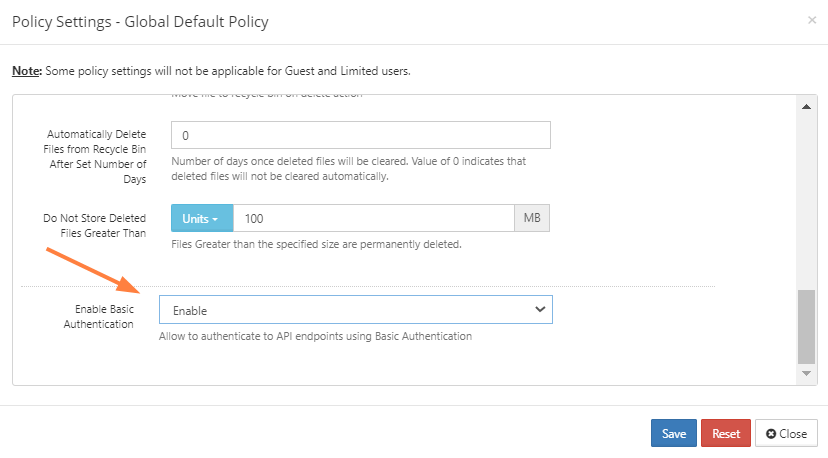
Now that we have the basic authentication middleware in place, the next crucial step is to implement user authentication and validation. This involves securely storing user credentials and verifying them against provided inputs. This process is fundamental to ensuring that only authorized users gain access to protected resources.Authentication and validation are core components of any security system. Properly implementing these steps helps prevent unauthorized access, protects sensitive data, and ensures the integrity of the application.
The following sections detail the critical aspects of user authentication and validation in an Express.js application.
Storing User Credentials
Storing user credentials securely is paramount. The choice of storage method significantly impacts the overall security of the application. Options range from simple in-memory storage (suitable only for development or testing) to robust database solutions.There are different ways to store user credentials, each with its own advantages and disadvantages:
- In-Memory Storage: This involves storing user credentials directly in variables within the application’s memory.
- Description: This is the simplest approach, often used for testing and development purposes. Credentials are typically stored in a JavaScript object.
- Example:
      const users =
          'user1':  password: 'hashedPassword1' ,
          'user2':  password: 'hashedPassword2'
      ;
- Description: More persistent than in-memory storage but still not ideal for production.
- Example: A JSON file could store user data like:
      [
           "username": "user1", "password": "hashedPassword1" ,
           "username": "user2", "password": "hashedPassword2"
      ]
- Description: Databases offer robust security features, scalability, and data management capabilities.
- Example: A simple schema for a user table in a relational database might include fields like `username`, `password`, `email`, and `creation_date`.
- Advantages: Secure, scalable, reliable, and supports complex data relationships.
- Disadvantages: Requires setting up and managing a database server, more complex implementation.
Password Security Approaches
Choosing the right method for storing passwords is critical for security. Directly storing passwords in plain text is extremely dangerous. Hashing and salting are essential techniques to protect passwords from being compromised.
Several techniques are used to securely store passwords:
- Hashing: This involves transforming the password into a fixed-size string using a one-way cryptographic function.
- Description: The hash is stored instead of the original password. If the same password is used, the hash generated should always be the same.
- Example: Using a hashing function like SHA-256.
- Advantages: Makes it difficult to recover the original password from the hash.
- Disadvantages: Vulnerable to brute-force attacks if the hash is weak or the salt is not strong enough.
- Salting: Adding a unique, random string (the salt) to each password before hashing.
- Description: Salts prevent pre-computed hash attacks (rainbow table attacks) and make each password hash unique, even if the same password is used.
- Example: Before hashing, append or prepend a unique salt to the password.
- Advantages: Significantly increases security against pre-computed hash attacks.
- Disadvantages: Requires proper implementation to be effective.
- Key Derivation Functions (KDFs): These are designed to be computationally expensive, slowing down brute-force attacks.
- Description: KDFs, such as bcrypt and Argon2, are specifically designed for password hashing and include salting and iteration counts.
- Example:
      const bcrypt = require('bcrypt');
      const saltRounds = 10; // Higher values mean more secure, but slower hashing
      bcrypt.hash('myPassword', saltRounds, function(err, hash)
          // Store the hash
      );
- Description: bcrypt incorporates salting and a work factor (cost parameter) to slow down attackers.
- Example:
      const bcrypt = require('bcrypt');
      const saltRounds = 10;
      bcrypt.hash('myPassword', saltRounds, function(err, hash)
          // Store the hash in the database
      );
- Description: Argon2 is designed to be resistant to GPU and specialized hardware attacks. It is the winner of the Password Hashing Competition.
- Example:
      const  hash, verify  = require('argon2');
      async function hashPassword(password)
          try
              const hashedPassword = await hash(password);
              return hashedPassword;
           catch (err)
              console.error(err);
Validating Username and Password
Validating the username and password involves comparing the provided credentials with the stored credentials. The process must handle hashing and salting correctly to ensure secure comparisons.
The steps involved in validating username and password are as follows:
- Retrieve User Credentials: Fetch the stored user credentials (username and password hash) from the chosen storage mechanism (e.g., database).
- Hash the Provided Password: Hash the password provided by the user using the same salt and hashing algorithm used when the password was originally stored.
- Compare Hashes: Compare the generated hash with the stored hash.
- If the hashes match, the password is valid.
- If the hashes do not match, the password is invalid.
- Authentication Result: Based on the comparison result, either grant or deny access.
For example, using bcrypt:
When a user attempts to log in, the application retrieves the stored hash for their username. The provided password is then hashed using bcrypt, using the same salt that was used when the password was created. If the generated hash matches the stored hash, the authentication is successful.
Handling Authentication Success and Failure
Authentication success and failure are critical aspects of any security system. They define how a system responds to valid and invalid user credentials, ensuring data protection and a smooth user experience. Properly handling these scenarios involves returning the correct information to the client, setting up appropriate session management (if applicable), and providing informative error messages.
Successful Authentication Response Structure
When authentication succeeds, the server needs to inform the client and, often, establish a secure session. The response should include information confirming successful authentication and potentially session-related data.
- HTTP Status Code: Use a 200 OK status code to indicate successful authentication.
- Response Body: The body can contain user-specific information. This might include:
- A success message.
- User details (e.g., username, roles, permissions). Be cautious about exposing sensitive data.
- A session identifier (e.g., a session cookie or a token).
- Headers (for Session-Based Authentication): If using sessions, set a session cookie in the response headers. This cookie will store the session ID, allowing the server to recognize the user in subsequent requests.
- Headers (for Token-Based Authentication): For token-based authentication, the response often includes an authentication token in the response body or in the `Authorization` header (e.g., `Authorization: Bearer
`).
Example (Token-Based Authentication):
Imagine a web application where users authenticate using their email and password. Upon successful authentication, the server generates a JSON Web Token (JWT) and sends it back to the client.
Response (200 OK):
  HTTP/1.1 200 OK

  Content-Type: application/json
{
"message": "Authentication successful",
"token": "eyJhbGciOiJIUzI1NiIsInR5cCI6IkpXVCJ9.eyJzdWIiOiIxMjM0NTY3ODkwIiwibmFtZSI6IkpvaG4gRG9lIiwiaWF0IjoxNTE2MjM5MDIyfQ.SflKxwRJSMeKKF2QT4fwpMeJf36POk6yJV_adQssw5c"
}
Authentication Failure and Error Handling
When authentication fails, the server must provide informative error messages to the client without revealing sensitive information about the authentication process. This is essential for both security and usability.
- HTTP Status Codes: Use appropriate HTTP status codes to signal the nature of the error.
- Error Messages: Provide clear and concise error messages.
- Handling Invalid Credentials: Handle incorrect usernames or passwords.
- Handling Unauthorized Access: Handle access to protected resources.
Here are the status codes and error messages:
- 401 Unauthorized: This status code is used when authentication is required, but the client has not provided credentials or the credentials are invalid.
- Error Message: “Invalid credentials” or “Authentication required.”
- 403 Forbidden: This status code is used when the client is authenticated but does not have permission to access the requested resource.
- Error Message: “Unauthorized access” or “Insufficient permissions.”
- 400 Bad Request: Use this code if the request is malformed or missing required information. This is appropriate if, for example, the request body is missing required fields.
- Error Message: “Invalid request body” or “Missing required fields.”
Example (Invalid Credentials):
If a user enters an incorrect password, the server should respond with a 401 status code and a clear error message, such as “Invalid credentials.” This prevents attackers from gaining information about the valid usernames on the system.
Response (401 Unauthorized):
  HTTP/1.1 401 Unauthorized

  Content-Type: application/json
{
"message": "Invalid credentials"
}
Example (Unauthorized Access):
Consider a scenario where a user tries to access an admin-only page. If the user is authenticated but does not have the “admin” role, the server should respond with a 403 status code and an appropriate error message.
Response (403 Forbidden):
  HTTP/1.1 403 Forbidden

  Content-Type: application/json
{
"message": "Unauthorized access"
}
Protecting Routes with Authentication
Now that the authentication middleware is in place, the next step is to protect specific routes, ensuring that only authenticated users can access them. This involves integrating the middleware into the route definitions to control access based on authentication status. This is a critical step in securing an application and ensuring that sensitive resources are protected.
Applying Authentication Middleware to Specific Routes
The primary method for protecting routes is to incorporate the authentication middleware into the route handler chain. This approach allows for fine-grained control over which routes require authentication and which do not. The middleware is executed before the route handler, and if authentication fails, the request is typically intercepted and an appropriate response (e.g., an error message or a redirect) is sent back to the client.Here’s how to apply the authentication middleware to specific routes:“`javascriptconst express = require(‘express’);const app = express();const basicAuth = require(‘./authMiddleware’); // Assuming your middleware is in authMiddleware.js// Example route that requires authenticationapp.get(‘/protected’, basicAuth, (req, res) => // If authentication passes, this code is executed res.send(‘Welcome to the protected area!’););// Example route that does not require authenticationapp.get(‘/public’, (req, res) => res.send(‘This is a public route.’););const port = 3000;app.listen(port, () => console.log(`Server listening on port $port`););“`In this example:
- The `/protected` route uses `basicAuth` middleware, meaning only authenticated users can access it.
- The `/public` route does not use the middleware, so it’s accessible to everyone.
Examples of Protecting Routes Using Middleware
Protecting routes is crucial for controlling access to different parts of an application. This can be achieved through various strategies depending on the application’s requirements. The following examples demonstrate different approaches to route protection using the authentication middleware:
- Protecting a User Profile Route: Imagine a route that displays a user’s profile information. This route should only be accessible to authenticated users. Applying the `basicAuth` middleware to this route ensures that only logged-in users can view their profile.
- Protecting an Admin Panel Route: For an admin panel, stricter access control is usually needed. You might have a specific authentication check or use a more sophisticated role-based access control (RBAC) system, but the core concept remains the same: the middleware verifies authentication before allowing access.
- Protecting API Endpoints: Many APIs require authentication to protect sensitive data. For example, an API endpoint for creating a new user or updating user data would use the authentication middleware to ensure that only authorized users can perform these actions.
Examples of Routes That Require Authentication
The following are concrete examples of routes that typically require authentication in a web application:
- Dashboard: The dashboard, containing personalized information, is usually only accessible to authenticated users.
- Profile Settings: Routes for updating user profiles (e.g., changing passwords, email addresses) always require authentication.
- Order History: A user’s order history is sensitive information and requires authentication to access.
- Admin Panel: Routes within an admin panel are strictly protected to ensure that only authorized administrators can access and modify system settings or data.
- Creating or Updating Data: Any route that allows users to create, modify, or delete data (e.g., posting a comment, submitting a form) requires authentication to prevent unauthorized actions.
Code Examples and Best Practices
This section provides a comprehensive code example demonstrating the entire basic authentication process in Express. It also Artikels best practices for securing your application, particularly concerning sensitive information management and further security enhancements. These practices are crucial for building robust and secure web applications.
Complete Code Example
The following example provides a complete, runnable Express application implementing basic authentication. This example includes setting up the server, defining the authentication middleware, creating a simple user database, and protecting a route. This example focuses on clarity and readability.“`javascriptconst express = require(‘express’);const basicAuth = require(‘express-basic-auth’);const app = express();const port = 3000;// In-memory user database (replace with a real database in production)const users = ‘user’: ‘password’,;// Authentication middlewareconst basicAuthMiddleware = basicAuth( users: users, unauthorizedResponse: (req) => return req.auth ?
‘Invalid credentials’ : ‘Unauthorized’; ,);// Protected routeapp.get(‘/protected’, basicAuthMiddleware, (req, res) => res.send(‘Protected route accessed successfully!’););// Public routeapp.get(‘/’, (req, res) => res.send(‘Hello, world!’););app.listen(port, () => console.log(`Server listening at http://localhost:$port`););“`This code defines a simple Express application with basic authentication.
The application utilizes the `express-basic-auth` middleware. It defines a basic user database (in this case, in-memory), and then applies the middleware to protect the `/protected` route. The `unauthorizedResponse` option customizes the response sent when authentication fails. A public route (`/`) is also included for comparison. When you run this code and attempt to access `/protected` without providing credentials, you will receive an ‘Unauthorized’ response.
If you provide valid credentials (user: user, password: password), you will successfully access the protected route. This example demonstrates the fundamental steps involved in implementing basic authentication. Remember to replace the in-memory user database with a more secure and robust database solution in a production environment.
Handling Sensitive Information
Protecting sensitive information, such as API keys, database credentials, and passwords, is critical for application security. Utilizing environment variables is a recommended best practice for storing and managing these values.
- Environment Variables: Environment variables allow you to store configuration data outside of your codebase. This prevents sensitive information from being hardcoded and exposed in your source code repository. These variables are typically set on the server or in a `.env` file during development.
- .env File: During development, you can use a `.env` file to store environment variables. This file is typically placed in the root directory of your project and should be included in your `.gitignore` file to prevent it from being committed to your repository. Libraries like `dotenv` can be used to load these variables into your application.
- Example using dotenv:
“`javascript// Install dotenv: npm install dotenvrequire(‘dotenv’).config(); // Load environment variables from .env fileconst express = require(‘express’);const basicAuth = require(‘express-basic-auth’);const app = express();const port = process.env.PORT || 3000; // Use environment variable for portconst username = process.env.BASIC_AUTH_USERNAME;const password = process.env.BASIC_AUTH_PASSWORD;// Check if username and password are providedif (!username || !password) console.error(‘Error: BASIC_AUTH_USERNAME and BASIC_AUTH_PASSWORD environment variables must be set.’); process.exit(1); // Exit the process if the variables are not setconst users = [username]: password, // Use environment variables for credentials;const basicAuthMiddleware = basicAuth( users: users, unauthorizedResponse: (req) => return req.auth ?
‘Invalid credentials’ : ‘Unauthorized’; ,);app.get(‘/protected’, basicAuthMiddleware, (req, res) => res.send(‘Protected route accessed successfully!’););app.get(‘/’, (req, res) => res.send(‘Hello, world!’););app.listen(port, () => console.log(`Server listening at http://localhost:$port`););“`In this updated example, the `dotenv` library is used to load environment variables from a `.env` file.
The username and password for basic authentication are now retrieved from the environment variables `BASIC_AUTH_USERNAME` and `BASIC_AUTH_PASSWORD`. The code includes error handling to ensure that these environment variables are set. This approach significantly improves the security and maintainability of your application.
Securing the Application Further
Beyond managing sensitive information, several additional measures can be implemented to enhance the security of your Express application using basic authentication. These measures address potential vulnerabilities and bolster the overall security posture of your application.
- HTTPS: Always serve your application over HTTPS. This encrypts the communication between the client and the server, protecting the credentials and other data transmitted during the authentication process. Acquire an SSL/TLS certificate from a trusted Certificate Authority (CA).
- Rate Limiting: Implement rate limiting to mitigate brute-force attacks. This limits the number of authentication attempts from a specific IP address within a given timeframe. Libraries like `express-rate-limit` can be used for this purpose.
- Input Validation and Sanitization: Validate and sanitize all user inputs to prevent injection attacks (e.g., SQL injection, cross-site scripting). This includes validating the username and password before they are used in the authentication process.
- Use a Strong Password Hashing Algorithm: While basic authentication sends credentials in a base64 encoded format, for more secure applications, consider using a more robust authentication method (e.g., JWT, OAuth 2.0) and a strong password hashing algorithm (e.g., bcrypt, Argon2) if storing user credentials in a database. This is especially critical if you plan to expand your application’s authentication system beyond basic authentication.
- Regular Security Audits: Conduct regular security audits of your application to identify and address potential vulnerabilities. This includes reviewing your code, dependencies, and server configuration.
By implementing these best practices, you can significantly improve the security of your Express application and protect it from common security threats. Remember that security is an ongoing process, and you should continuously monitor and update your security measures to stay ahead of evolving threats.
Testing the Authentication Implementation
Testing is a crucial step in verifying the functionality and security of your basic authentication implementation. Thorough testing ensures that authentication mechanisms work as expected, protecting your application’s protected resources. This section Artikels how to test your authentication implementation using tools like Postman or curl, detailing expected responses for success and failure scenarios.
Testing Tools and Setup
Testing your authentication requires tools capable of making HTTP requests and inspecting the responses. Postman and curl are popular choices, offering flexibility and control over request headers and bodies.
- Postman: A graphical user interface (GUI)-based tool for constructing and sending HTTP requests. It allows you to easily set headers, body data, and view responses, making it ideal for testing authentication.
- curl: A command-line tool for transferring data with URLs. It’s a versatile tool for scripting and automating tests.
Before testing, ensure your Express application is running and accessible. Verify that the authentication middleware and protected routes are correctly configured. You should have a user account set up in your application’s data store for successful authentication.
Testing Protected Routes
Testing involves sending requests to protected routes and verifying the server’s responses based on the authentication status. The following tests should be performed:
- Successful Authentication: Sending a request with valid credentials (username and password) in the `Authorization` header.
- Failed Authentication: Sending a request with invalid credentials or no credentials in the `Authorization` header.
Testing with Postman
Postman provides a user-friendly interface for these tests.
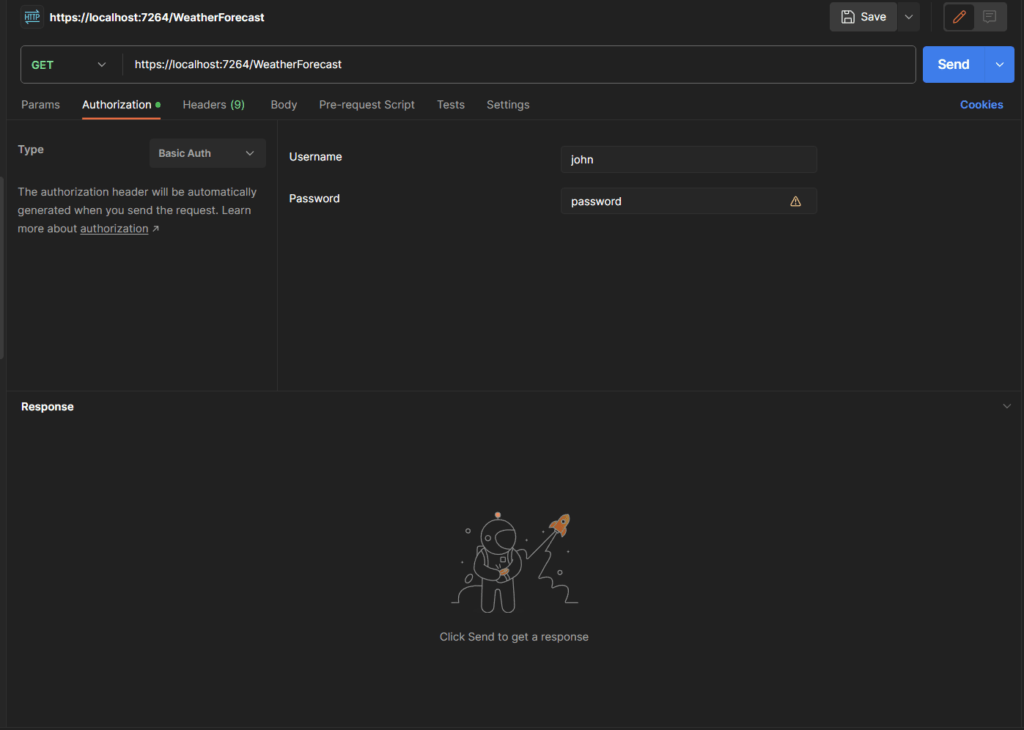
- Setting up the Request: Create a new request in Postman. Select the appropriate HTTP method (e.g., GET) and enter the URL of the protected route.
- Adding the Authorization Header: Navigate to the “Authorization” tab in Postman. Select “Basic Auth” from the “Type” dropdown. Enter the username and password of a valid user. Postman will automatically encode the credentials in the correct format for the `Authorization` header (Base64).
- Sending the Request and Inspecting the Response: Send the request and examine the response.
Testing with curl
curl provides a command-line approach.
- Successful Authentication Example:
`curl -u username:password http://localhost:3000/protected`
This command sends a GET request to `/protected` with the username and password provided. Replace `username` and `password` with valid credentials.
- Failed Authentication Example:
`curl http://localhost:3000/protected`
This command sends a GET request to `/protected` without any authentication credentials. The server should respond with an appropriate error message (e.g., 401 Unauthorized).
- Using Base64 Encoding: If you prefer to manually create the `Authorization` header, use Base64 encoding. First, combine the username and password separated by a colon (e.g., `username:password`). Then, encode this string using Base64.
`echo -n “username:password” | base64`
The output is the Base64 encoded string.
- Constructing the curl Command with Base64:
`curl -H “Authorization: Basic
” http://localhost:3000/protected` Replace `
` with the Base64 encoded credentials.
Expected Responses
The server’s responses should adhere to HTTP status codes and appropriate messages.
- Successful Authentication: The server should respond with a 200 OK status code and the requested resource’s content.
- Failed Authentication: The server should respond with a 401 Unauthorized status code. The response body may contain an error message, such as “Unauthorized” or “Invalid credentials.”
The content of the response body is up to your application’s design. However, it’s essential to include informative error messages for debugging.
Enhancements and Considerations
Basic authentication, while straightforward to implement, presents several limitations and security concerns. Understanding these aspects is crucial for making informed decisions about its suitability for a given application. Furthermore, it is important to consider how to mitigate its weaknesses and adapt it for production environments.
Limitations of Basic Authentication
Basic authentication has inherent vulnerabilities that must be carefully considered. It transmits credentials in a way that makes it susceptible to several attacks.
- Vulnerability to Eavesdropping: Basic authentication transmits the username and password in a Base64 encoded format. This encoding is easily reversible and does not provide encryption. Therefore, if intercepted during transit, an attacker can readily decode the credentials.
- Lack of Protection Against Replay Attacks: Basic authentication does not include mechanisms to prevent replay attacks. An attacker could capture the Base64 encoded credentials and reuse them to gain unauthorized access.
- Absence of Session Management: Basic authentication is stateless. It doesn’t manage sessions, meaning each request requires the credentials to be sent again. This can lead to performance overhead and makes it difficult to implement features like “remember me” functionality.
- Limited Customization: The basic authentication flow is relatively inflexible. It offers limited options for customization, making it challenging to integrate with more complex authentication systems or to tailor the authentication process to specific application needs.
Benefits of Using HTTPS with Basic Authentication
Implementing HTTPS is essential when using basic authentication to mitigate some of its inherent risks. HTTPS encrypts the communication between the client and server, providing a secure channel for transmitting the credentials.
- Encryption of Credentials: HTTPS encrypts all data exchanged between the client and server, including the Base64 encoded credentials. This prevents eavesdropping and makes it much more difficult for an attacker to intercept and decode the credentials.
- Protection Against Man-in-the-Middle Attacks: HTTPS helps protect against man-in-the-middle attacks by verifying the server’s identity through digital certificates. This ensures that the client is communicating with the intended server and not an imposter.
- Improved Data Integrity: HTTPS provides data integrity, ensuring that the data transmitted between the client and server has not been tampered with during transit.
- Enhanced Trust and User Experience: The use of HTTPS provides users with a sense of security and trust, as they can see the padlock icon in their browser’s address bar, indicating a secure connection. This can lead to a better user experience.
Considerations for Production Environments
Deploying basic authentication in a production environment requires careful planning and security hardening to minimize the risks. Here are key considerations.
- HTTPS Implementation: As mentioned earlier, always use HTTPS to encrypt all communication between the client and server. This is a fundamental requirement for the security of basic authentication in a production environment.
- Rate Limiting: Implement rate limiting to protect against brute-force attacks. Limit the number of authentication attempts from a single IP address within a specific time frame. This can significantly reduce the effectiveness of password-guessing attacks.
- Strong Password Policies: Enforce strong password policies that require users to choose passwords that are at least a certain length, include a mix of uppercase and lowercase letters, numbers, and special characters. Regularly review and update password policies to reflect evolving security best practices.
- Regular Security Audits: Conduct regular security audits and penetration testing to identify and address vulnerabilities. These audits should include an assessment of the basic authentication implementation, as well as the overall security posture of the application.
- Monitoring and Logging: Implement comprehensive monitoring and logging to track authentication attempts, successes, and failures. Analyze logs for suspicious activity, such as multiple failed login attempts from the same IP address.
- Defense in Depth: Implement a defense-in-depth strategy, which means layering security controls to provide multiple layers of protection. Even if one layer is compromised, other layers can still protect the system. For example, combine rate limiting with strong password policies and regular security audits.
- Alternatives to Basic Authentication: Consider using more secure authentication methods for production environments, such as OAuth 2.0, OpenID Connect, or JWT (JSON Web Tokens). These methods offer improved security and flexibility compared to basic authentication. While basic authentication can be suitable for specific internal APIs or non-sensitive applications, these alternatives are generally preferred for public-facing applications.
Illustrative Examples of Code Snippets (using HTML tables)
To solidify the concepts discussed, let’s examine some practical code snippets. These examples provide a clear illustration of how to implement basic authentication in an Express.js application, covering the core middleware function, route protection, and server setup. The use of HTML tables allows for a structured and easily digestible presentation of the code.Understanding these code examples is crucial for effectively integrating basic authentication into your projects.
Core Middleware Function
The core of basic authentication lies in the middleware function that verifies the credentials. This function parses the `Authorization` header, extracts the username and password, and compares them against the stored credentials. The following table demonstrates a basic implementation:
| File | Description | Code Snippet | Explanation |
|---|---|---|---|
| `authMiddleware.js` | This file contains the middleware function that handles authentication. |
|
The `authenticate` function is the core middleware. It retrieves the credentials from the `Authorization` header using the `basic-auth` module. It then checks if the provided username and password match the stored credentials. If the authentication fails, it sends a `401 Unauthorized` status with a `WWW-Authenticate` header. If successful, it sets `req.user` and calls `next()`. |
Route Protection Examples
Once the middleware is defined, it can be applied to protect specific routes. This involves including the middleware function before the route handler. This table illustrates how to apply the middleware to protect different routes:
| Route | Description | Code Snippet | Explanation |
|---|---|---|---|
| `/protected` | This route requires authentication to access. |
|
The `authenticate` middleware is placed before the route handler for `/protected`. Any request to this route will first pass through the authentication middleware. If the authentication fails, the route handler will not be executed. |
| `/public` | This route is accessible without authentication. |
|
This route does not include the `authenticate` middleware, making it accessible to all users. |
Setting Up the Express Server
The setup of the Express server involves defining the necessary dependencies, middleware (including the authentication middleware), and routes. The following table presents a basic example of how to set up an Express server with basic authentication:
| File | Description | Code Snippet | Explanation |
|---|---|---|---|
| `app.js` | This file contains the main application setup. |
|
This code sets up an Express application, imports the authentication middleware, defines a public route and a protected route, and starts the server on port 3000. It demonstrates how to integrate the authentication middleware into the application’s route definitions. |
Illustrative Examples of Code Snippets (using blockquotes)
This section provides practical code examples to illustrate key aspects of implementing basic authentication in Express. These snippets cover user validation, error handling, and base64 decoding, offering a clear understanding of how these components function within the authentication process.
User Validation Process
User validation is a critical step in authentication, ensuring the provided credentials match those stored securely. The following example demonstrates how to validate a username and password against a database.
This example shows a simplified user validation function:
async function validateUser(username, password)
  try
    const user = await User.findOne( username: username );
    if (!user)
      return false; // User not found


    const isMatch = await bcrypt.compare(password, user.password);
    if (!isMatch)
      return false; // Incorrect password


    return user; // Authentication successful
   catch (error)
    console.error("Validation error:", error);
    return false; // Error during validation
This code snippet retrieves a user from a hypothetical `User` model (assuming a database interaction using a library like Mongoose). It checks if the user exists and then compares the provided password with the hashed password stored in the database using `bcrypt.compare`. If either check fails, it returns `false`; otherwise, it returns the user object, indicating successful authentication.
Error Handling Examples
Robust error handling is essential for a secure and user-friendly authentication system. The following example demonstrates how to handle authentication errors.
This example illustrates error handling within an authentication middleware:
function authenticate(req, res, next)
  const authHeader = req.headers.authorization;

  if (!authHeader)
    return res.status(401).json( message: 'Unauthorized: No credentials provided' );


  const auth = Buffer.from(authHeader.split(' ')[1], 'base64').toString().split(':');
  const username = auth[0];
  const password = auth[1];

  validateUser(username, password)
    .then(user =>
      if (!user)
        return res.status(401).json( message: 'Unauthorized: Invalid credentials' );

      req.user = user;
      next();
    )
    .catch(err =>
      console.error("Authentication error:", err);
      return res.status(500).json( message: 'Internal server error' );
    );
This snippet checks for the presence of the `Authorization` header. If missing, it returns a 401 Unauthorized error with a descriptive message. It decodes the base64 encoded credentials and attempts to validate the user. If the validation fails or an error occurs during validation, appropriate error responses are sent. The `catch` block handles potential errors during the validation process, logging the error and returning a 500 Internal Server Error.
Base64 Decoding Process
Base64 decoding is used to convert the encoded credentials from the `Authorization` header back into a readable format. This process is vital for extracting the username and password.
The following demonstrates the Base64 decoding process:
const authHeader = req.headers.authorization;
if (authHeader)
  const encoded = authHeader.split(' ')[1]; // Extract the encoded part
  const decoded = Buffer.from(encoded, 'base64').toString();
  const [username, password] = decoded.split(':');

  console.log('Username:', username);
  console.log('Password:', password);
This code extracts the base64 encoded string from the `Authorization` header. The `Buffer.from(encoded, ‘base64’)` function decodes the base64 string into a buffer, and `.toString()` converts the buffer into a string. The decoded string is then split by a colon (‘:’) to separate the username and password.
Conclusive Thoughts
In conclusion, we’ve navigated the intricacies of how to setup basic authentication in express, providing a solid foundation for securing your Express applications. We’ve covered everything from setting up your environment and implementing middleware to protecting routes and handling sensitive information. Remember to always consider the limitations of basic authentication and employ best practices, such as using HTTPS, to ensure the security of your application.
This knowledge will empower you to build more secure and reliable web services.